Tooltip · Feature discovery
ClickUp’s tooltip highlights features you can use
ClickUp uses a tooltip anchored to the + icon in a list view to show users they can add columns, with a preview of the menu and a Got it button.
Screenshot added to the library in February 2022; its exact capture date wasn’t recorded, and the product may look different today. Write-up reviewed 22 Oct 2026.
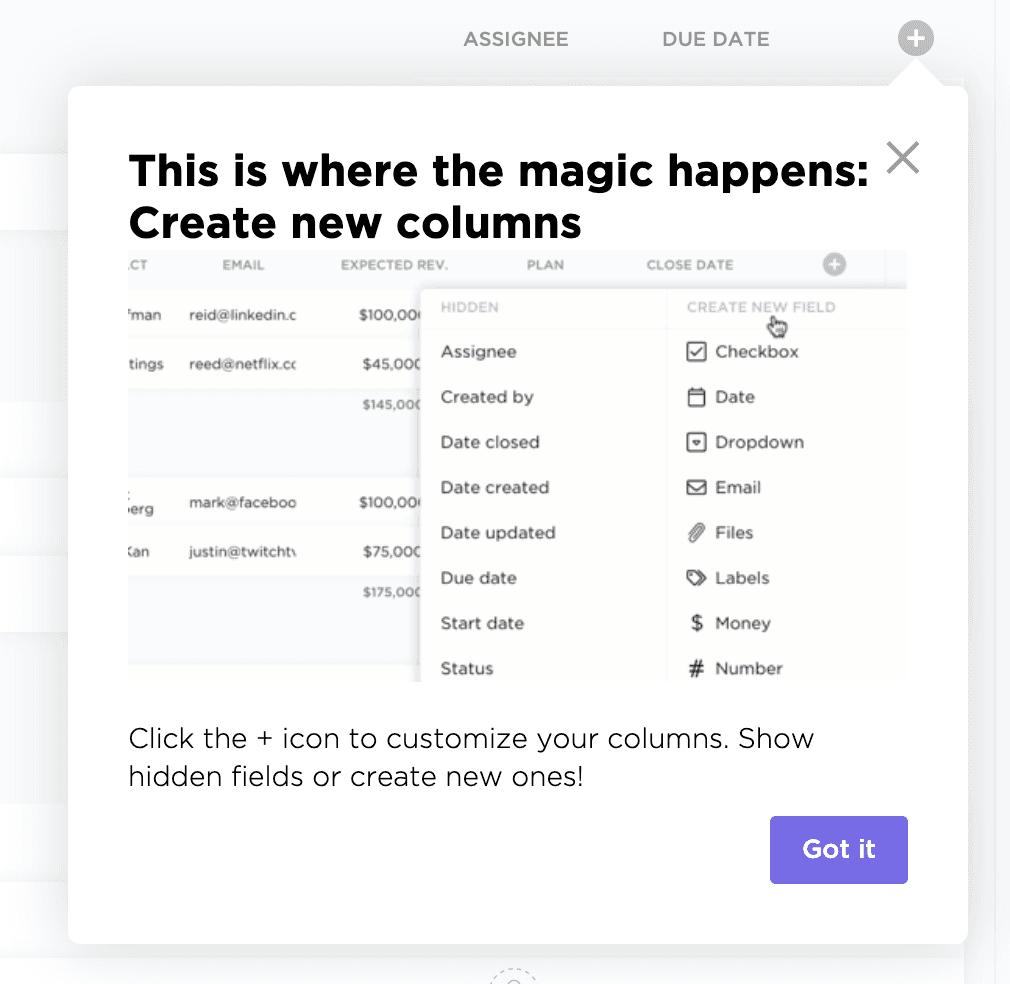
ClickUp points existing users to features they may not be using yet. At the time of the screenshot, it did so with a feature tooltip anchored to the + icon at the end of a list's column headers. The headline reads "This is where the magic happens: Create new columns", a preview shows the menu of hidden fields and new field types, and one line explains: "Click the + icon to customize your columns. Show hidden fields or create new ones!" A Got it button closes it.
Why it works
✅ Right element for a recommendation: a tooltip is smaller than a feature pop-up or promotional modal, so suggesting a feature this way doesn't get in the user's way.
✅ Anchored to the feature: the tooltip's arrow points at the + icon itself, so users know exactly where to click once they close it.
✅ Shows instead of tells: the preview shows what's behind the + icon (field types such as Checkbox, Date, Dropdown and Money) without making users open the menu first.
More on this pattern: SaaS onboarding tooltip examples and product adoption.