
User onboarding
Microsoft Outlook’s survey modal asks the right questions
Microsoft Outlook asks how users plan to use their account in an in-app survey modal, with six tick-box answers and the Outlook logo up top.
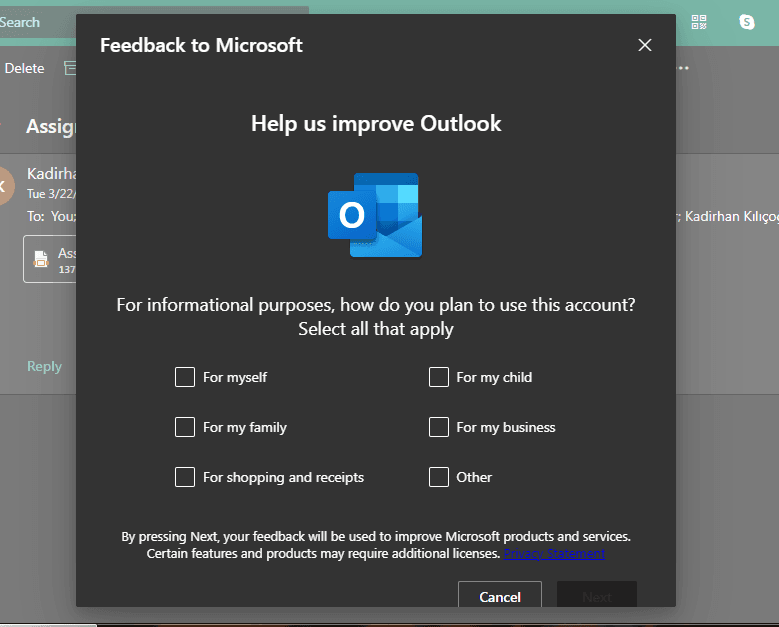
At the time of the screenshot, Outlook on the web opened a survey modal called "Feedback to Microsoft" while the user was reading their mail. Under the headline "Help us improve Outlook" and the Outlook logo, it asks: "For informational purposes, how do you plan to use this account? Select all that apply." Six tick boxes follow (for myself, my family, shopping and receipts, my child, my business, other), with a short privacy note and Cancel and Next buttons at the bottom.
Why it works
✅ In-app, not by email: an email client could easily have sent this survey as an email, where it would sit among everything else. Asking inside the product catches users while they're already engaged.
✅ Short copy, clear hierarchy: "Help us improve Outlook" comes first and gives the user a reason to answer, the question comes next, and the legal note is last in small type.
✅ The Outlook logo: it doesn't add information, but it tells users at a glance which product the question is about.
More on this pattern: in-app survey types and UI modals.


