
Onboarding teardown · Semrush
Semrush onboarding, screen by screen: from signup to a first site audit
We had an AI agent sign up for Semrush's free plan as a fictional product manager and go through onboarding until it had a first site audit. Quillmark is made up, so when Semrush asked for a website the agent entered this one, useronboarding.academy. A person stepped in once, to create the account, which accepts the terms. These are the screens it saw, in order, with what each one does well and what gets in the way.
By the UserOnboarding Academy teamRecorded 5 Nov 2026How we recorded it
UserOnboarding Academy isn't owned by Semrush or any onboarding tool, and Semrush didn't sponsor or review this page. The account was created for this recording only.
In short
Semrush takes a new user from an email form to a finished site audit in 11 screens, and the free plan is always one click away: no card is asked for. Three one-click questions shape the account, and creating a project needs only a domain. It then runs the first reports on its own: authority, keywords, backlinks and a 100-page audit with the five issues to fix first. The cost is what Semrush decides without asking. The trial page builds its pitch on a website taken from the email address (for our agent, an email provider's site, because Quillmark is made up), the dashboard picks a market for the site without saying why, and the first screen inside the app reads like a sales page, with two more trial buttons.
- Screens to first value
- 11
- Setup questions
- 3
- Form fields shown
- 5
- Steps a person did
- 1
The flow at a glance
marks a step a person did
 01Homepage with a website field and three free-sounding buttons
 02Signup: Google or a single email field
 03Password, a newsletter box and Create account
 04Verify your email with a six-digit code
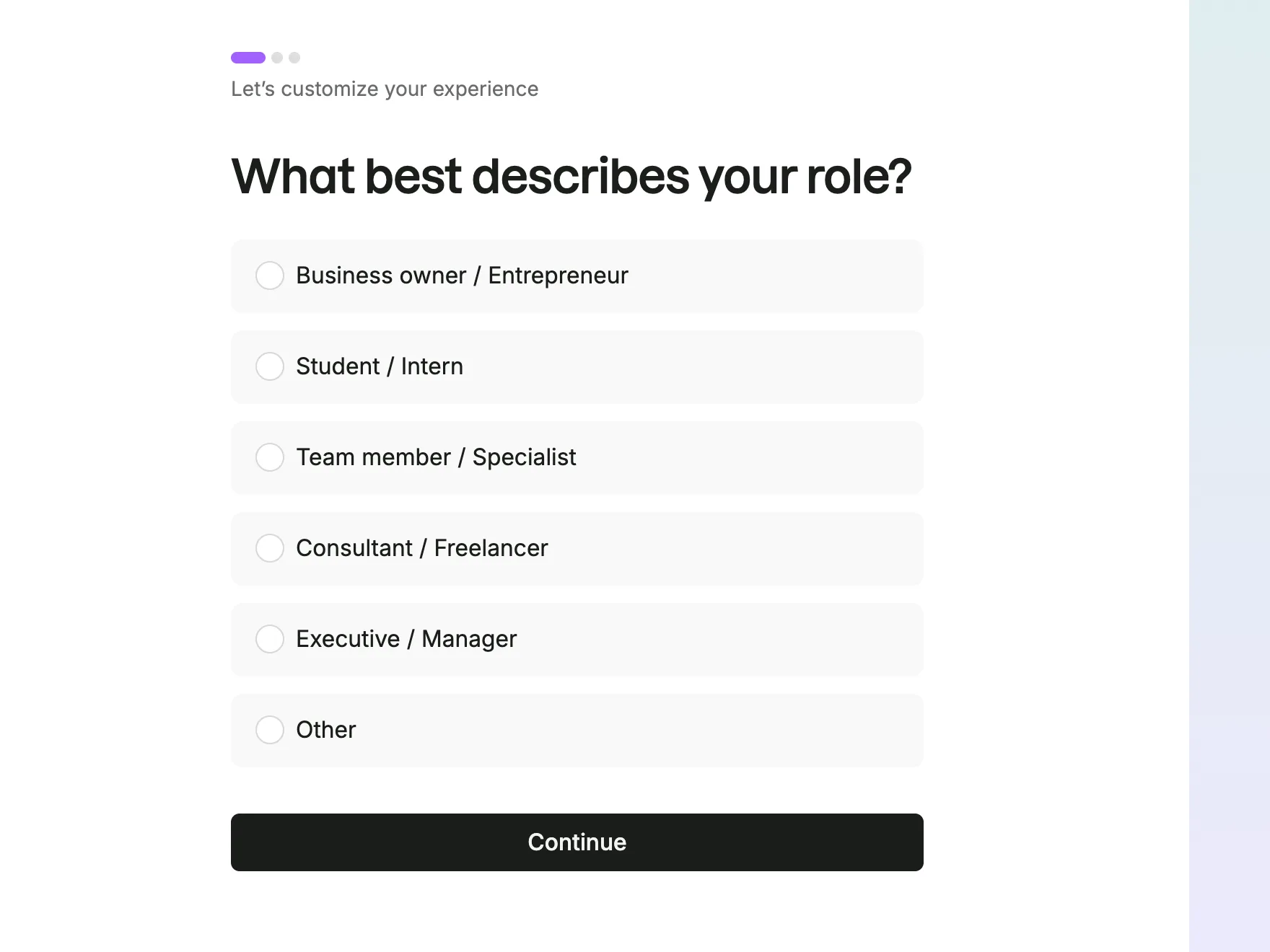 05Role question: six answers about your position, with three progress dots
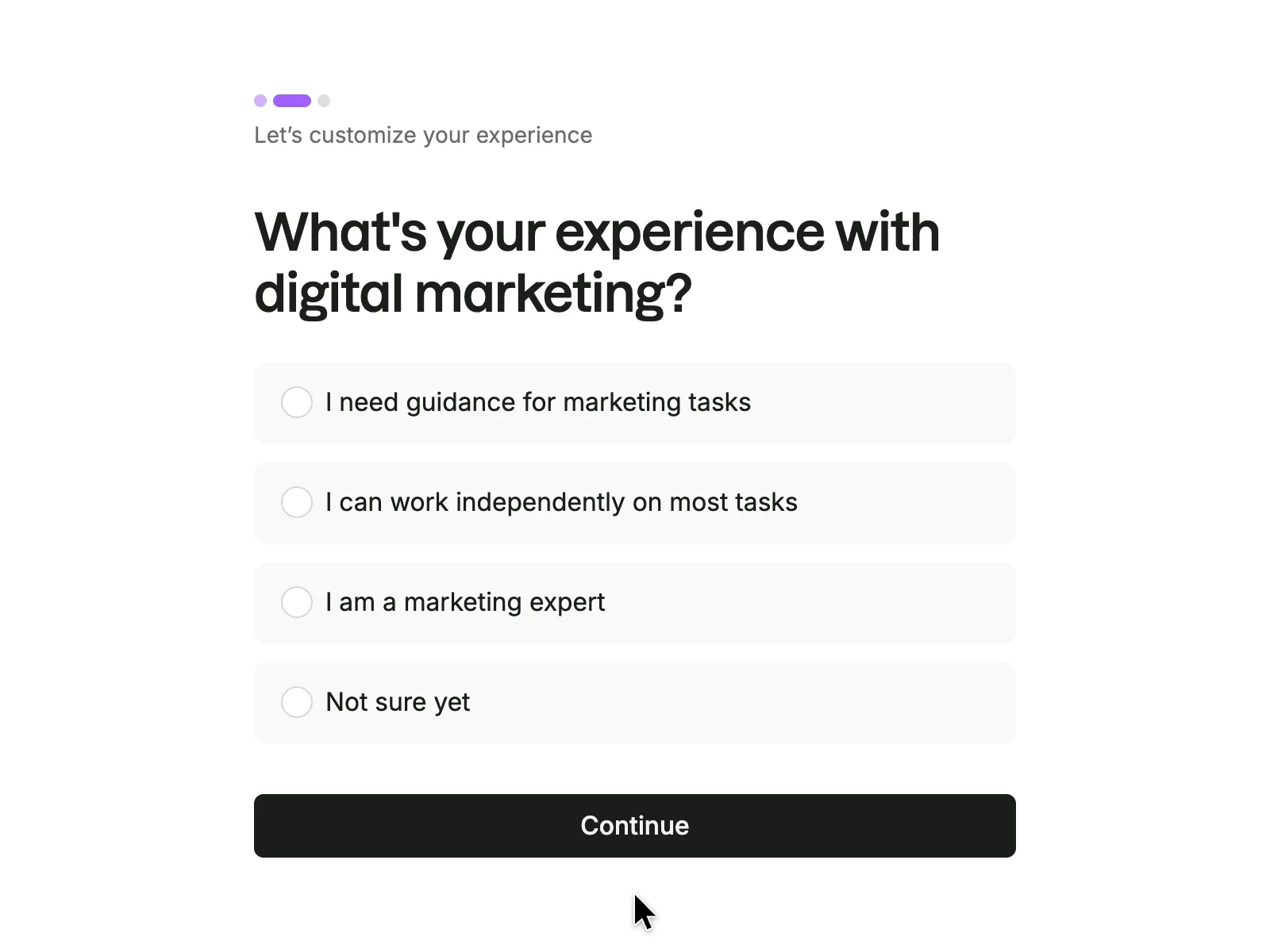 06Experience question in four answers
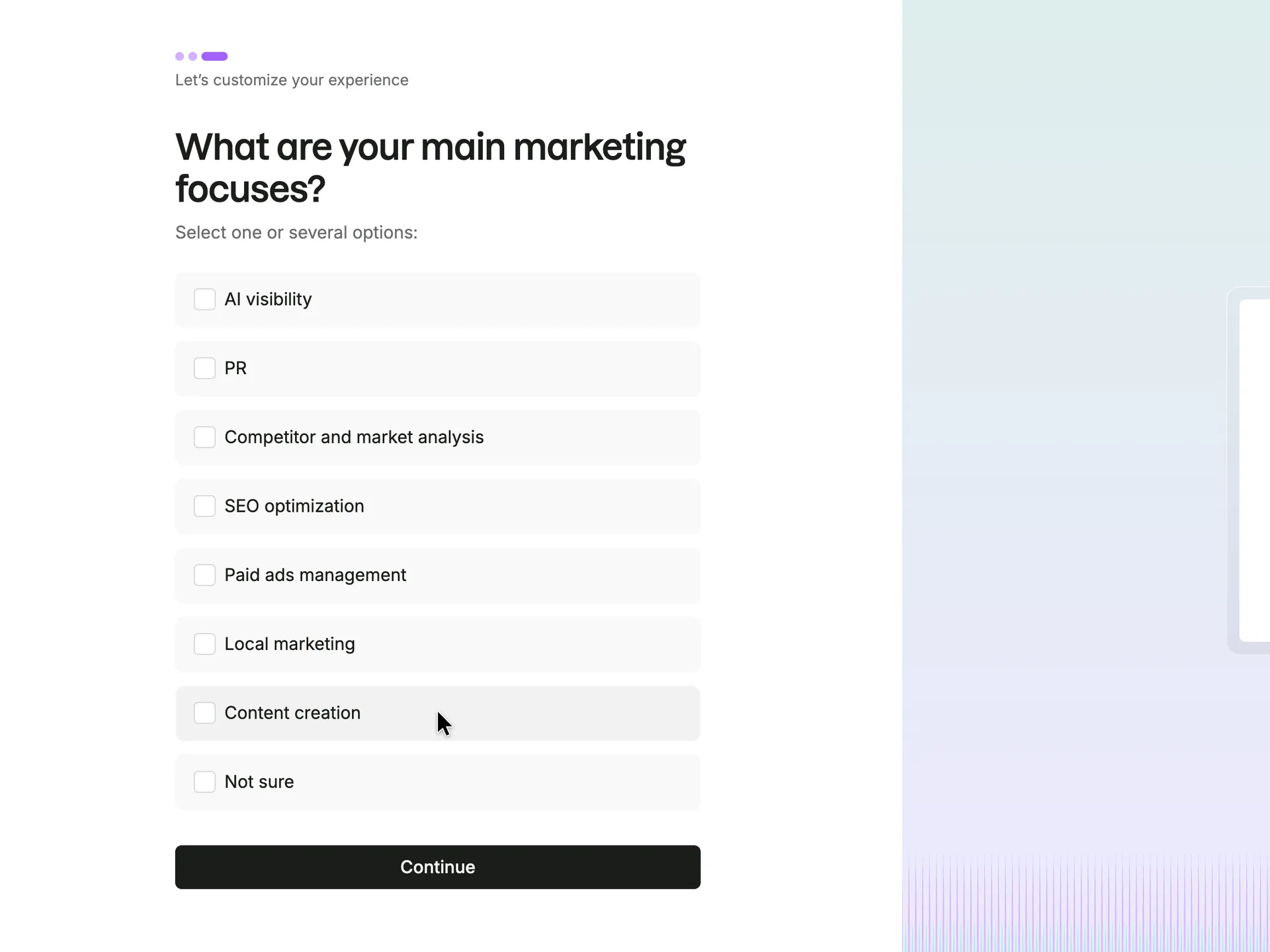 07Focus question: tick one or several
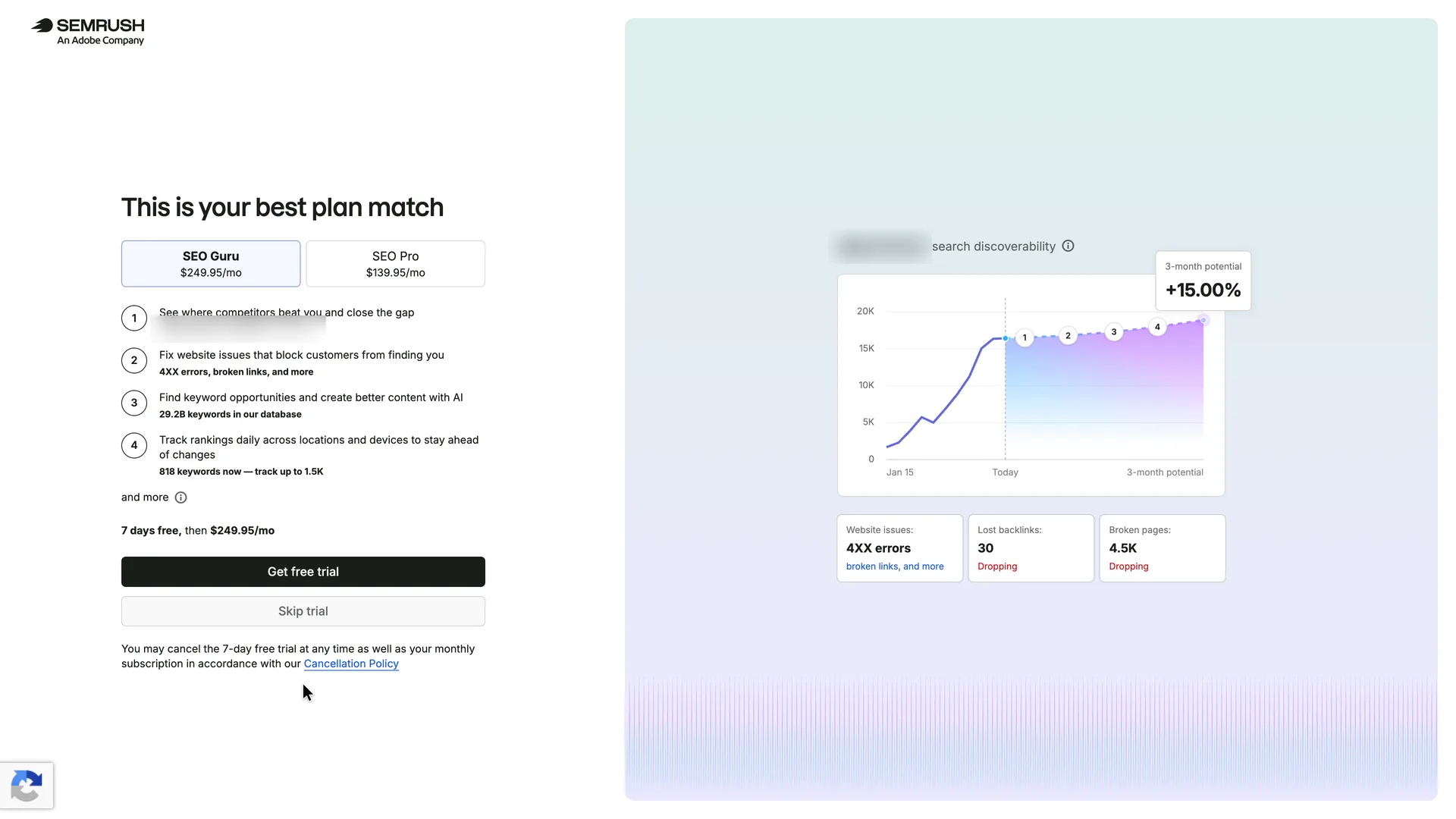 08A trial offer built on the website in the email address
 09The SEO Toolkit's empty state is a sales page
 10A dashboard of real data, set to a market Semrush picked for the site
 11 · first valueSite Audit: a health score and the top five issues
Step 1 of 11:Other
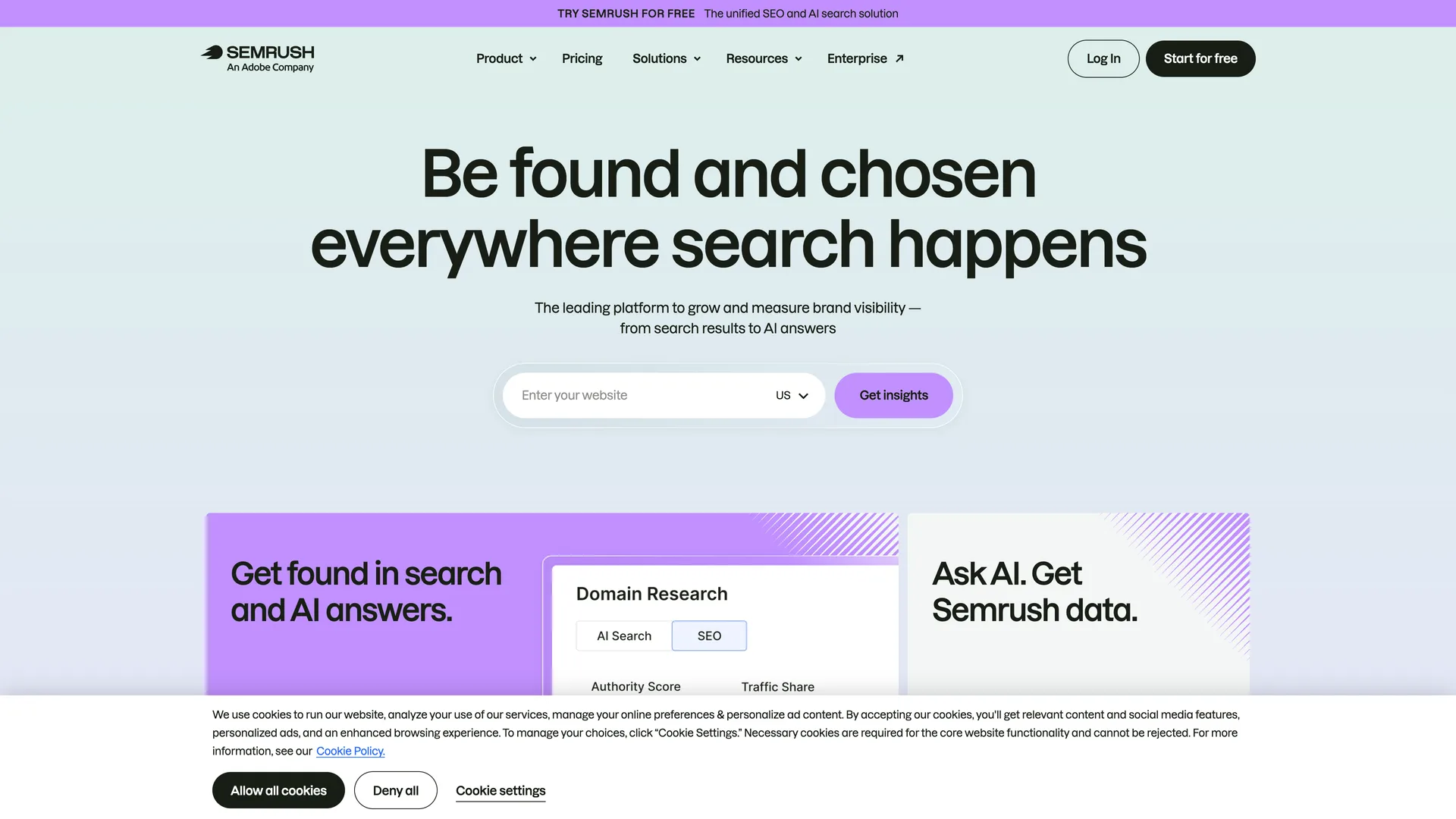
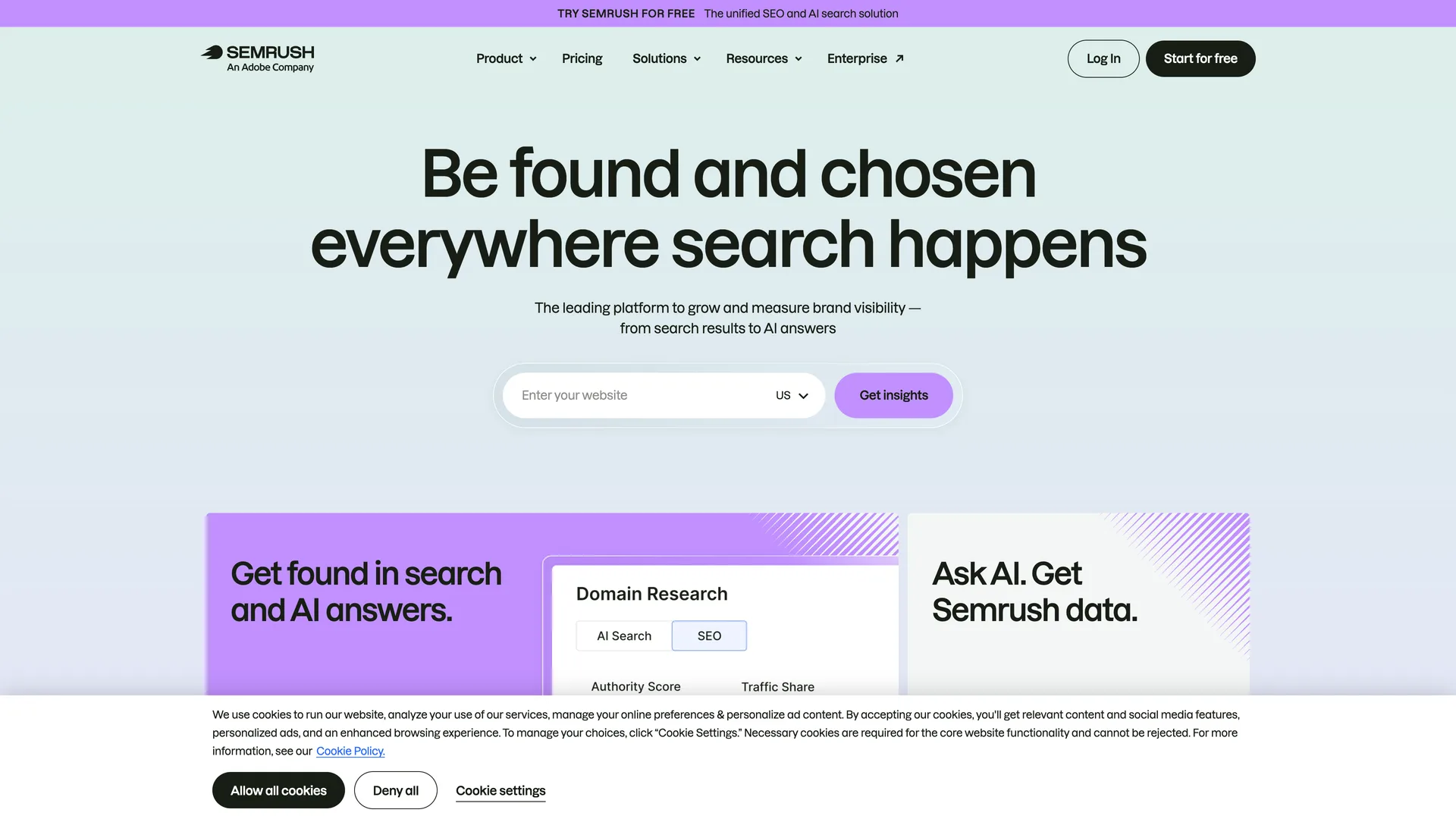
Homepage with a website field and three free-sounding buttons
Pressed Deny all on the cookie banner, then Start for free in the header
Why it works
The hero asks for the one thing the product works on, a website, so a visitor sees where they would start before signing up. Deny all sits beside Allow all at the same size, so declining cookies takes one click.
What gets in the way
Three buttons on one screen promise something free (the top bar, Get insights, Start for free) and none says whether it leads to a free plan or a trial.
What’s on this screen
The homepage opens with 'Be found and chosen everywhere search happens', an 'Enter your website' field with a US country picker and a Get insights button. A purple bar across the top reads 'TRY SEMRUSH FOR FREE The unified SEO and AI search solution'. The header has Product, Pricing, Solutions, Resources, Enterprise, Log In and Start for free. A cookie banner covers the bottom of the screen with Allow all cookies, Deny all and Cookie settings.
Step 2 of 11:Signup form
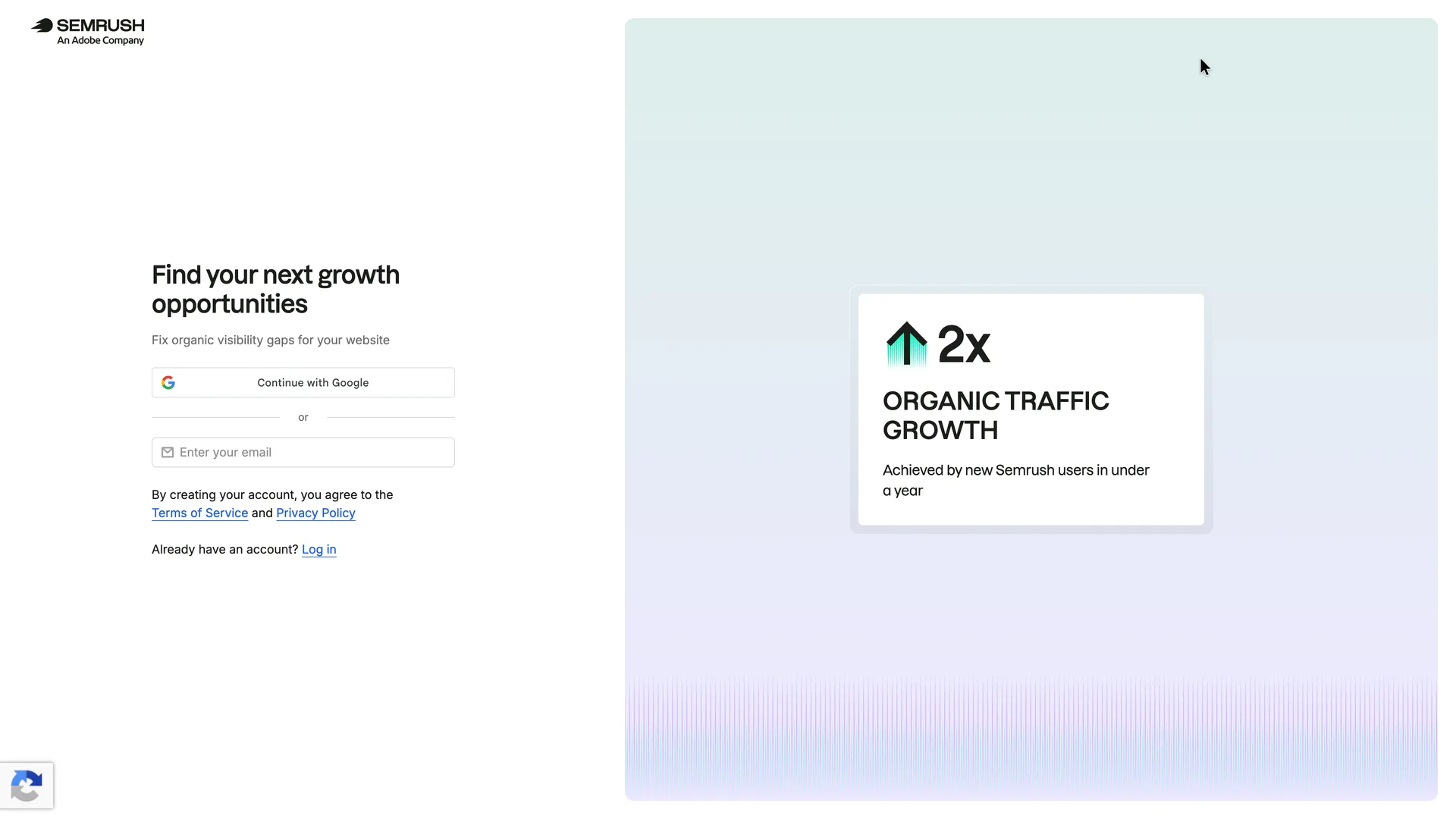
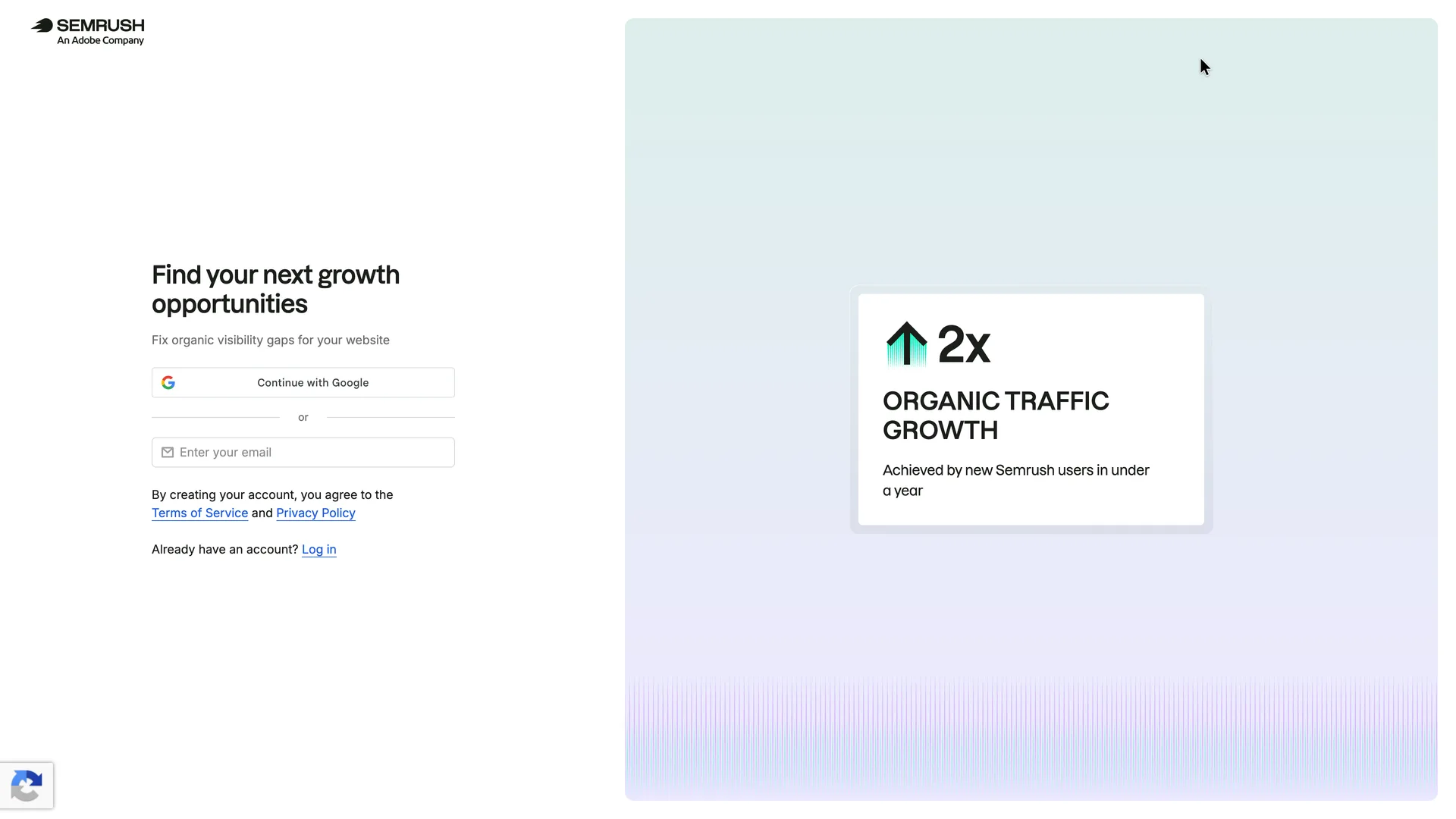
Signup: Google or a single email field
Typed the email; the form grew a password field, a newsletter box and a Create account button
Why it works
One field and one Google button make a short first screen; the rest of the form appears only once there is an email, so the page never asks for more than the next thing.
What gets in the way
The '2x organic traffic growth' figure has no source or footnote on the page. With no button under the email field, a visitor has to type before they can see what the form will ask next.
What’s on this screen
Heading 'Find your next growth opportunities' over 'Fix organic visibility gaps for your website'. Continue with Google, then 'or' and one 'Enter your email' field with no button under it yet. Below: 'By creating your account, you agree to the Terms of Service and Privacy Policy' and a Log in link. The right half is a card reading '2x Organic traffic growth, achieved by new Semrush users in under a year'. A reCAPTCHA badge sits in the bottom left corner.
Step 3 of 11:Signup formDone by a person
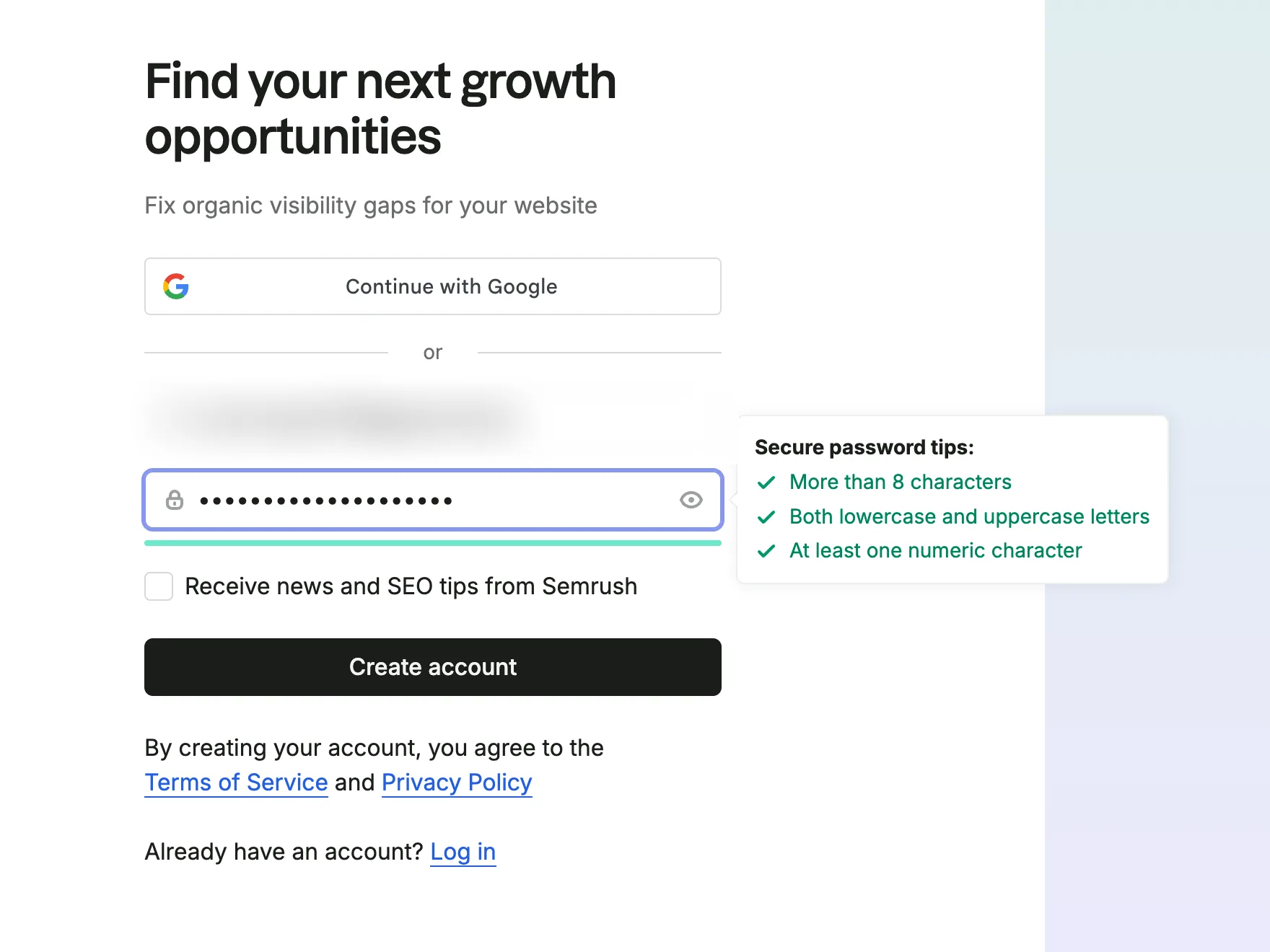
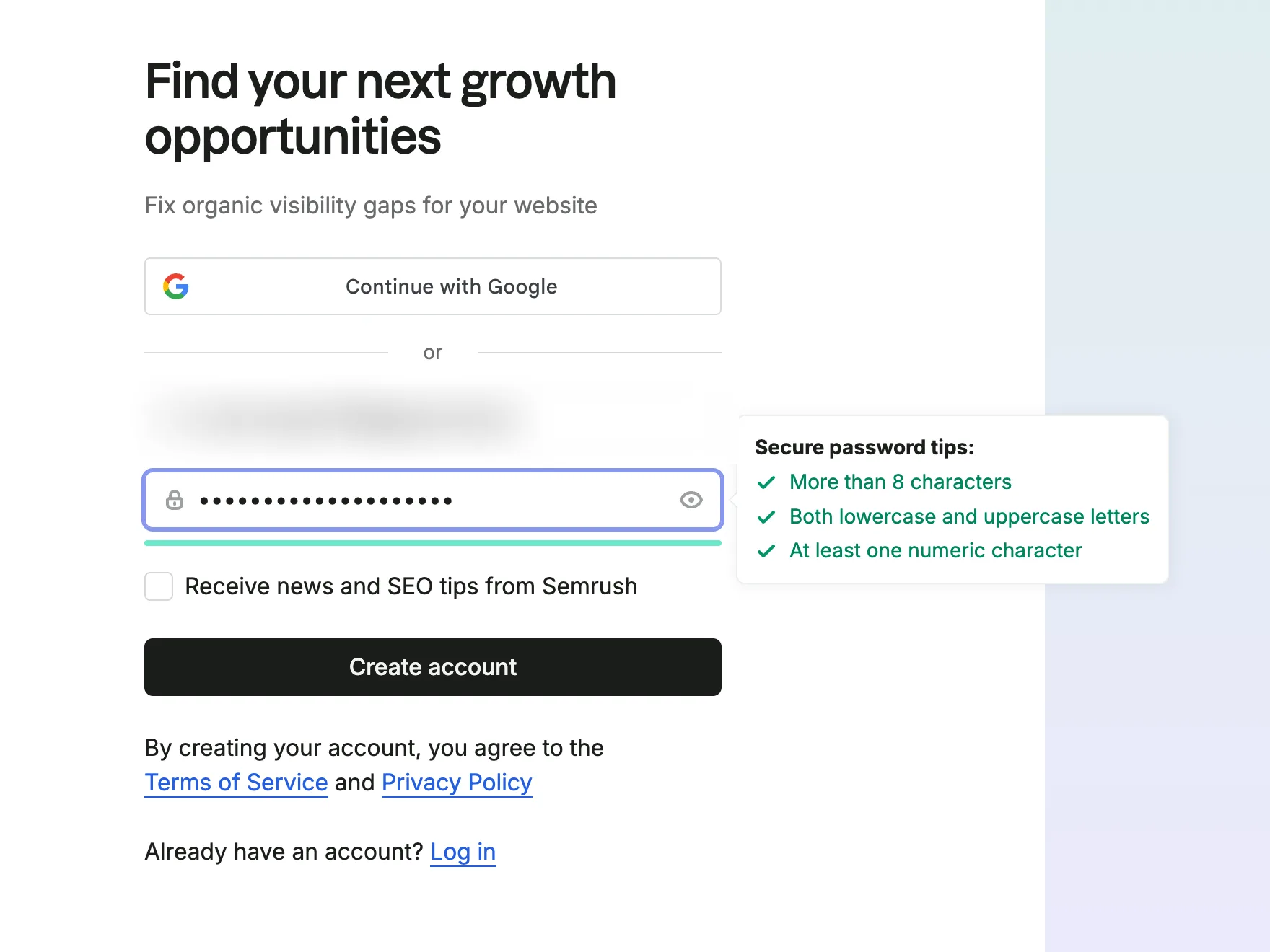
Password, a newsletter box and Create account
The agent typed a password; a person pressed Create account, which accepts the terms. No CAPTCHA challenge appeared
Why it works
The password rules turn green as they are met, so nobody submits a password only to be told it fails. Marketing email is opt-in: the box starts unticked. The terms line sits directly under the button that accepts them.
What’s on this screen
Typing the email added a password field with a show button, a 'Receive news and SEO tips from Semrush' checkbox (unticked) and a black Create account button. While the password is typed, a 'Secure password tips' box ticks off three rules in green: more than 8 characters, lowercase and uppercase letters, at least one numeric character. The terms line now sits under Create account.
Step 4 of 11:Email verification
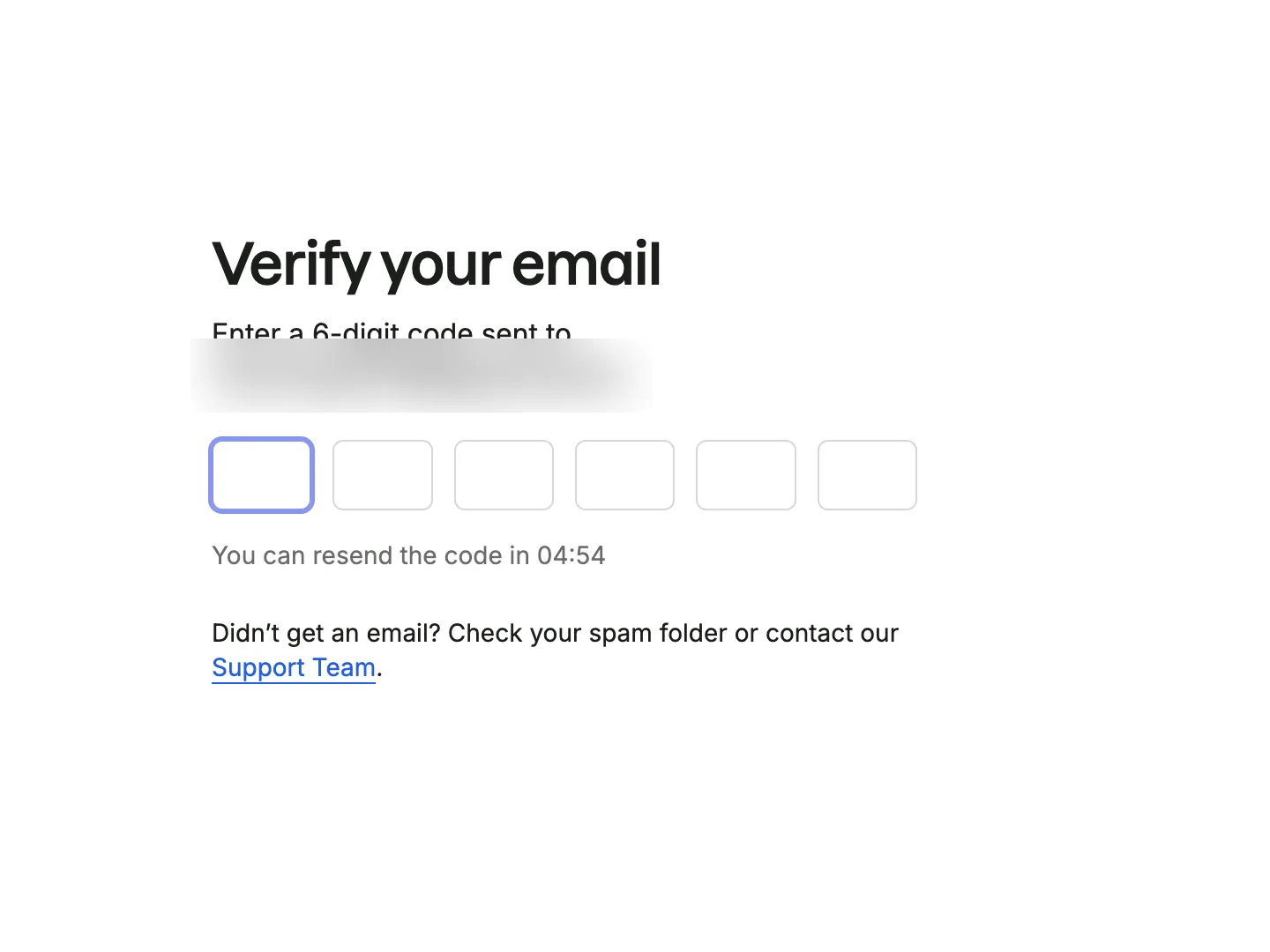
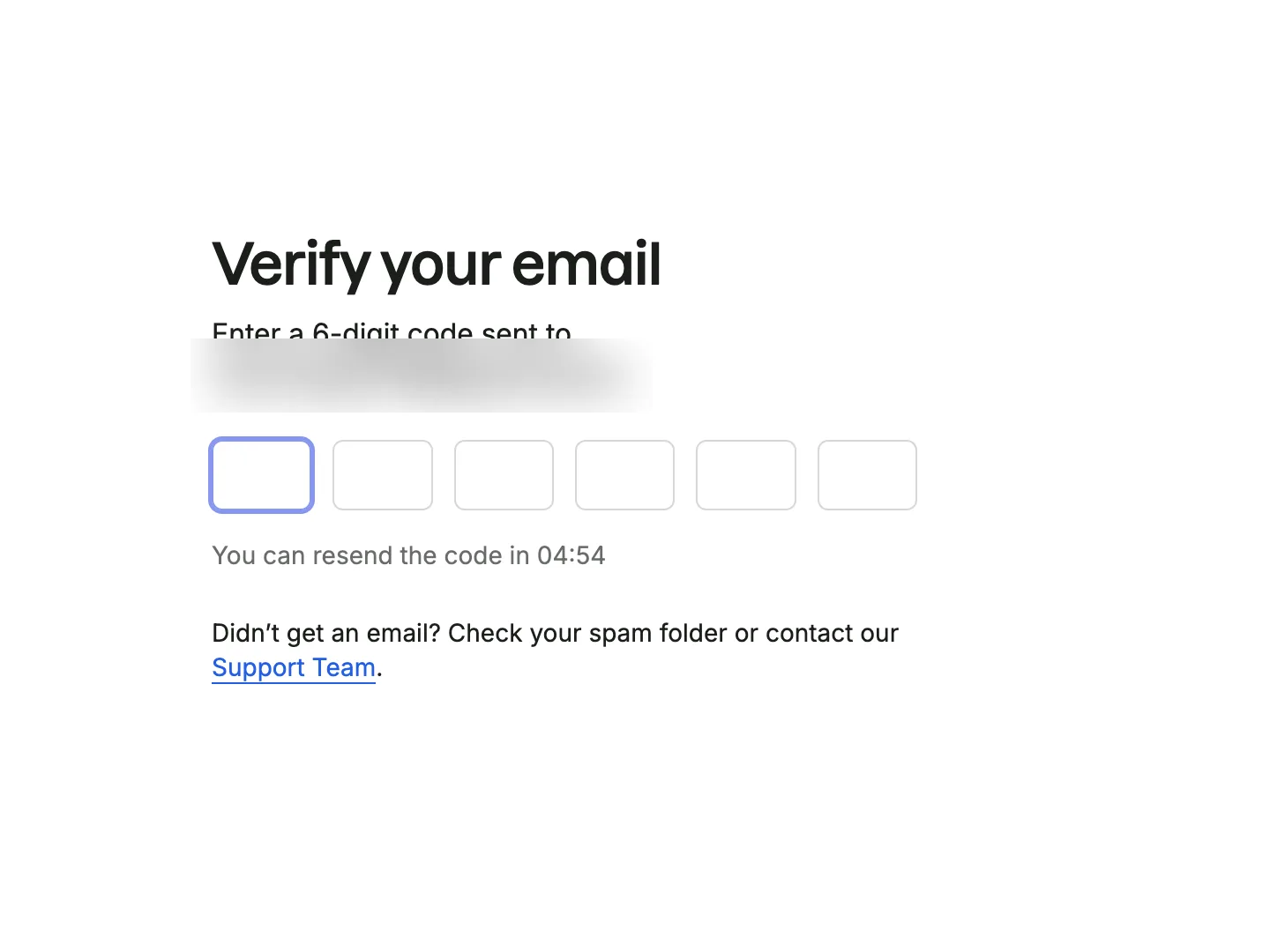
Verify your email with a six-digit code
Typed the six-digit code from Semrush's email; the form submitted itself on the last digit
Why it works
A code keeps the new user in the same tab, and it submits on the sixth digit, so there is no extra button to press. The help line mentions the spam folder before anyone has to ask.
What’s on this screen
'Verify your email' and 'Enter a 6-digit code sent to' the address, six single-digit boxes, a resend timer counting down from five minutes, and 'Didn't get an email? Check your spam folder or contact our Support Team.' The email, 'Verification code for Semrush', comes from noreply@semrush.com.
Step 5 of 11:Setup question
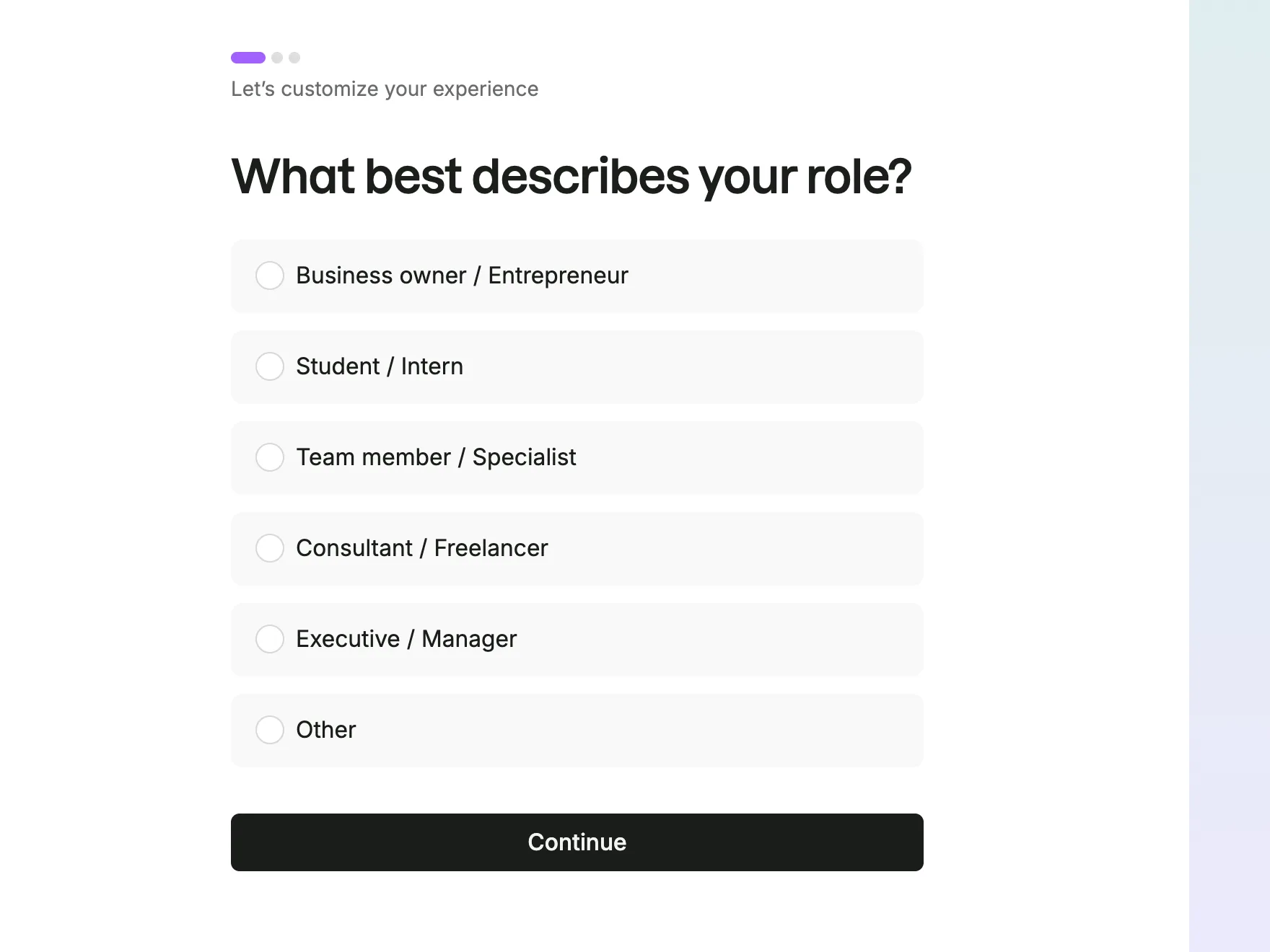
Role question: six answers about your position, with three progress dots
Chose Executive / Manager and pressed Continue
Why it works
Three dots show that the survey is three questions long and which one this is. The answers describe a person's position in their company, not a job title, so a marketer, a product manager or a salesperson can each answer in one click.
What’s on this screen
'Let's customize your experience' under three progress dots, the first one long and purple, over 'What best describes your role?' with six answers: Business owner / Entrepreneur, Student / Intern, Team member / Specialist, Consultant / Freelancer, Executive / Manager, Other. One Continue button.
Step 6 of 11:Setup question
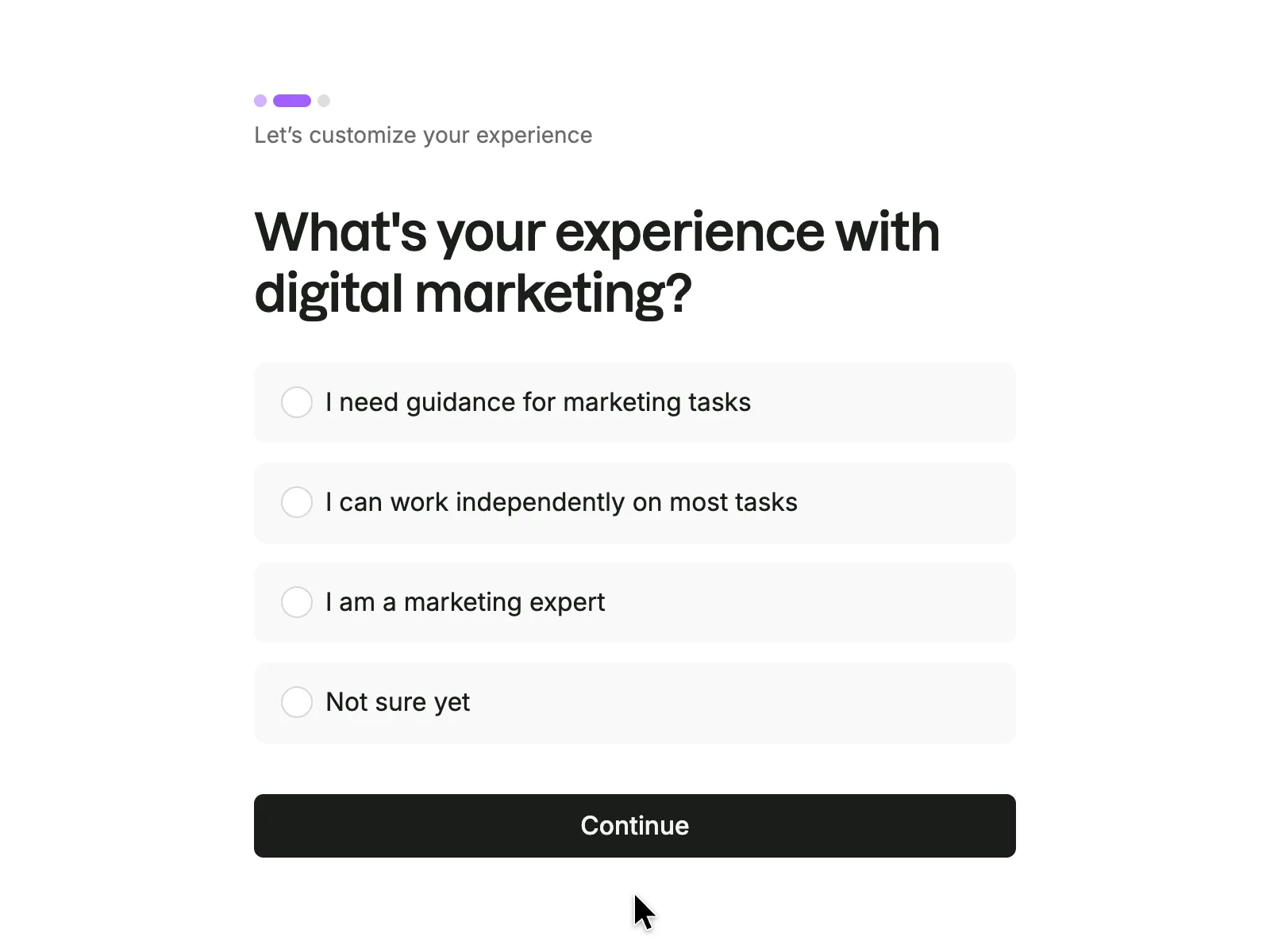
Experience question in four answers
Chose 'I need guidance for marketing tasks' and pressed Continue
Why it works
The answers describe what the person can do rather than asking them to rate themselves, and 'Not sure yet' gives a way out.
What gets in the way
After answering that we needed guidance, none of the following screens showed a tour, a checklist or any beginner help.
What’s on this screen
The same heading, the second dot now long and purple, and 'What's your experience with digital marketing?' with four answers: I need guidance for marketing tasks, I can work independently on most tasks, I am a marketing expert, Not sure yet.
Step 7 of 11:Setup question
Focus question: tick one or several
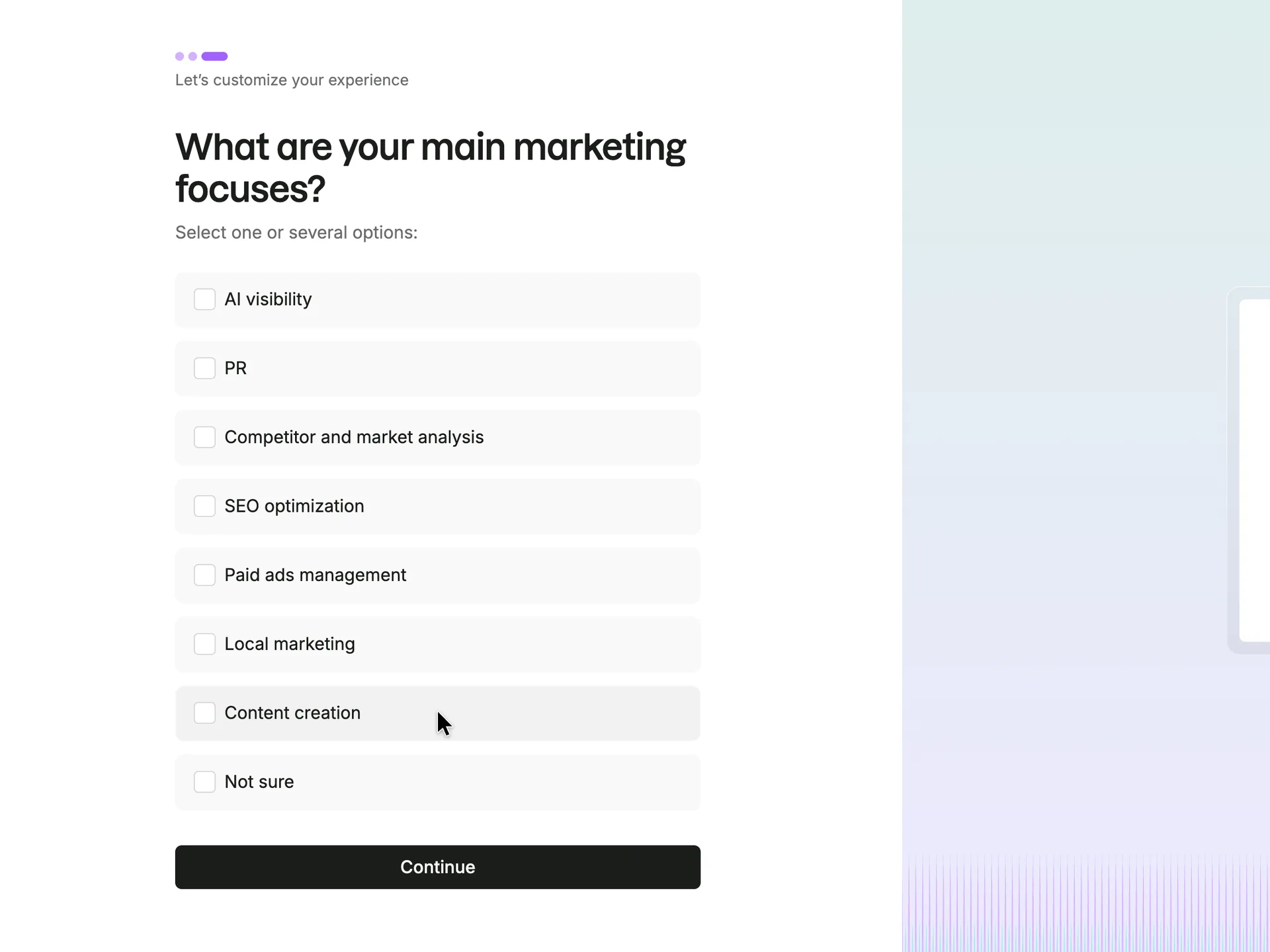
Ticked SEO optimization only and pressed Continue
Why it works
The options match the toolkits in Semrush's left menu, and with SEO optimization ticked every following screen was about SEO: SEO plans, then the SEO Toolkit.
What gets in the way
Three questions in, nothing has asked about the website, the thing the product analyses. Semrush takes it from the email address instead, as the next screen shows.
What’s on this screen
The third dot is now long and purple. 'What are your main marketing focuses?' with 'Select one or several options:' and eight checkboxes: AI visibility, PR, Competitor and market analysis, SEO optimization, Paid ads management, Local marketing, Content creation, Not sure.
Step 8 of 11:Plan choice
A trial offer built on the website in the email address
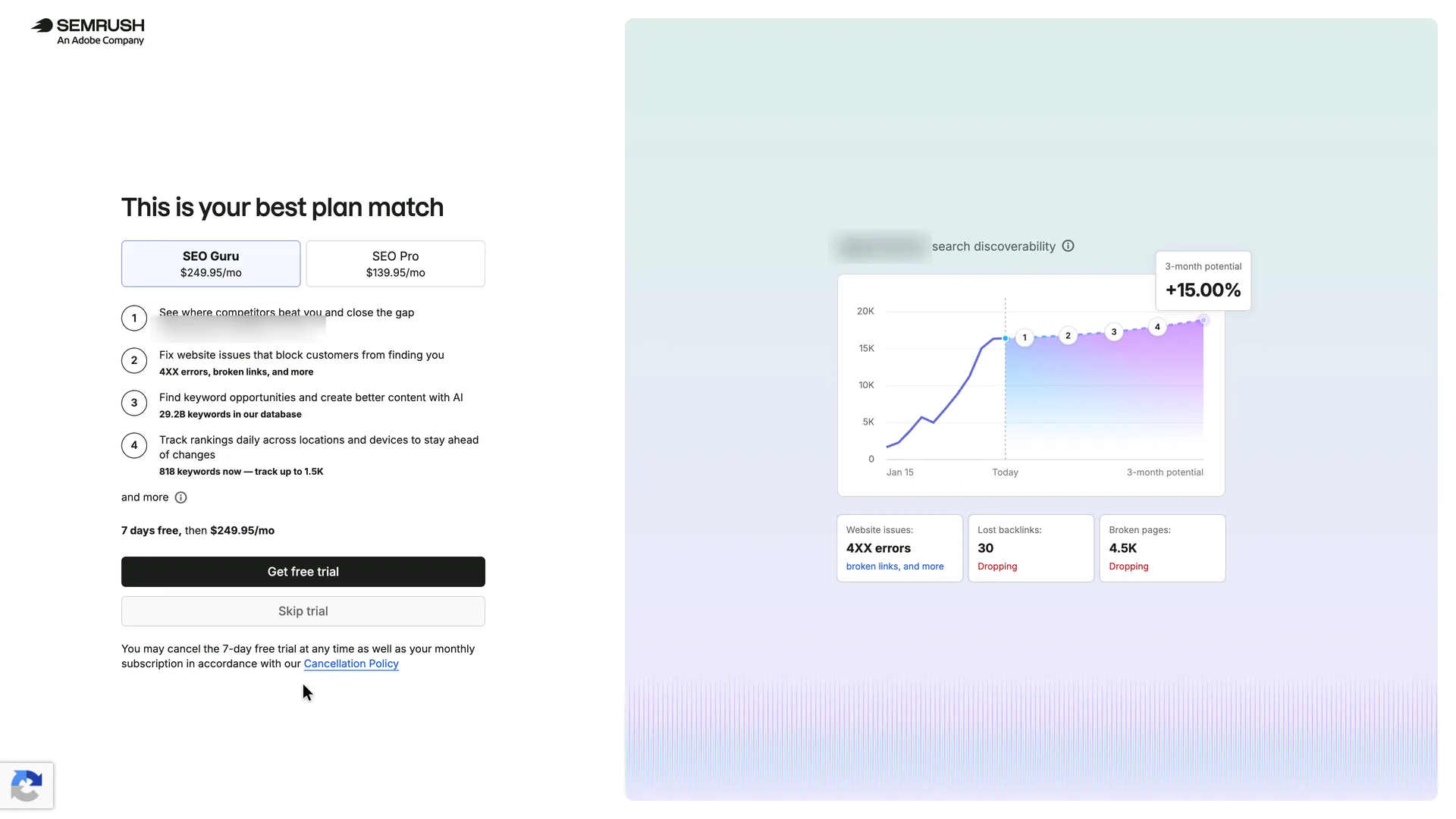
Pressed Skip trial
Why it works
Skip trial is on the same screen, full width, directly under the trial button, and no payment details are asked for on either path. With a work email, the numbers would be the user's own site: a preview of what Semrush finds before they choose a plan.
What gets in the way
Here the preview didn't work, and the cause is our setup: with an address on an email provider's domain, the 'best plan match' and its numbers describe the provider's website, not Robin's. The same happens to anyone who signs up with a personal or shared address, which makes the pitch risky: it rests on another company's data, nothing on screen says where the domain came from, and there is no way to correct it before choosing a plan. The dearer plan is also preselected, and Skip trial is styled as the lesser choice.
What’s on this screen
'This is your best plan match' with two tabs: SEO Guru at $249.95/mo (selected) and SEO Pro at $139.95/mo. Four numbered benefits each carry a detail from one domain: two named competitors, '4XX errors, broken links, and more', 29.2B keywords in Semrush's database, and 818 keywords it could track (up to 1.5K). '7 days free, then $249.95/mo', a black Get free trial button, a grey Skip trial button and a link to the cancellation policy. The right half charts that domain's 'search discoverability' since 15 January with a '3-month potential +15.00%' label, above three cards: Website issues, Lost backlinks 30 and Broken pages 4.5K, the last two marked Dropping. The domain is the one in the signup email address; Semrush never asked for a website. Quillmark is made up, so the agent's address is on an email provider's domain, and the chart is the provider's site.
Step 9 of 11:Empty state
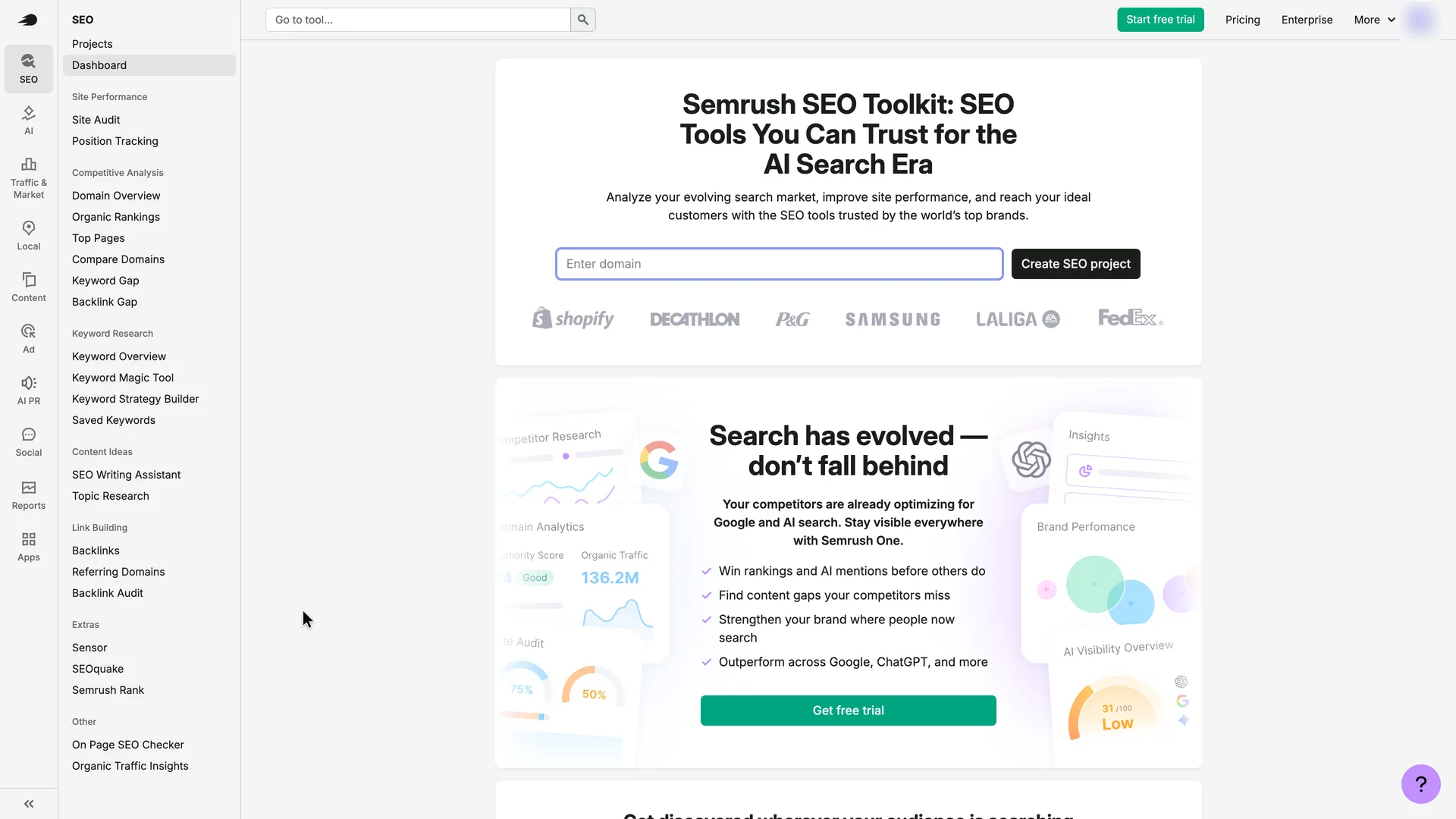
The SEO Toolkit's empty state is a sales page
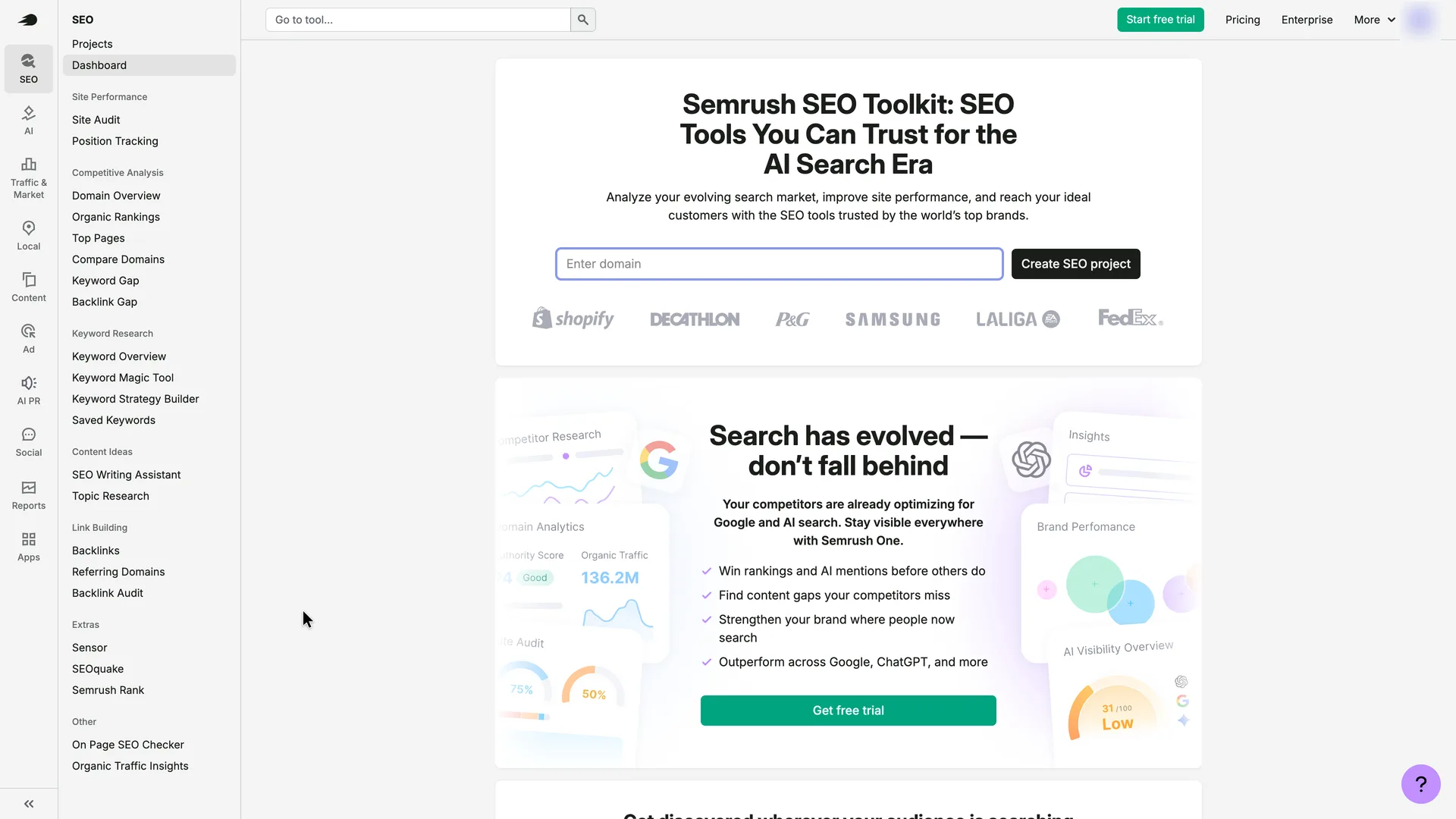
Typed useronboarding.academy into Enter domain and pressed Create SEO project
Why it works
The one field on screen is the one that matters, and a single click creates a project, with no setup wizard.
What gets in the way
Straight after skipping a trial, the first screen in the app reads like the marketing site: a headline, logos and two more trial buttons. The domain field is empty, although the trial page had already taken a domain from the email address. Nothing says what a project is or what creating one will run.
What’s on this screen
The app opens on its SEO section: a left rail of toolkits (SEO, AI, Traffic & Market, Local, Content, Ad, AI PR, Social, Reports, Apps) and an SEO menu of 25 tools, with Dashboard highlighted. The main area is 'Semrush SEO Toolkit: SEO Tools You Can Trust for the AI Search Era', an empty 'Enter domain' field with Create SEO project, and customer logos (Shopify, Decathlon, P&G, Samsung, LaLiga, FedEx). Below sits a card about AI search and Semrush One with a green Get free trial button; a green Start free trial button is in the top bar. No welcome message, tour or checklist.
Step 10 of 11:Other
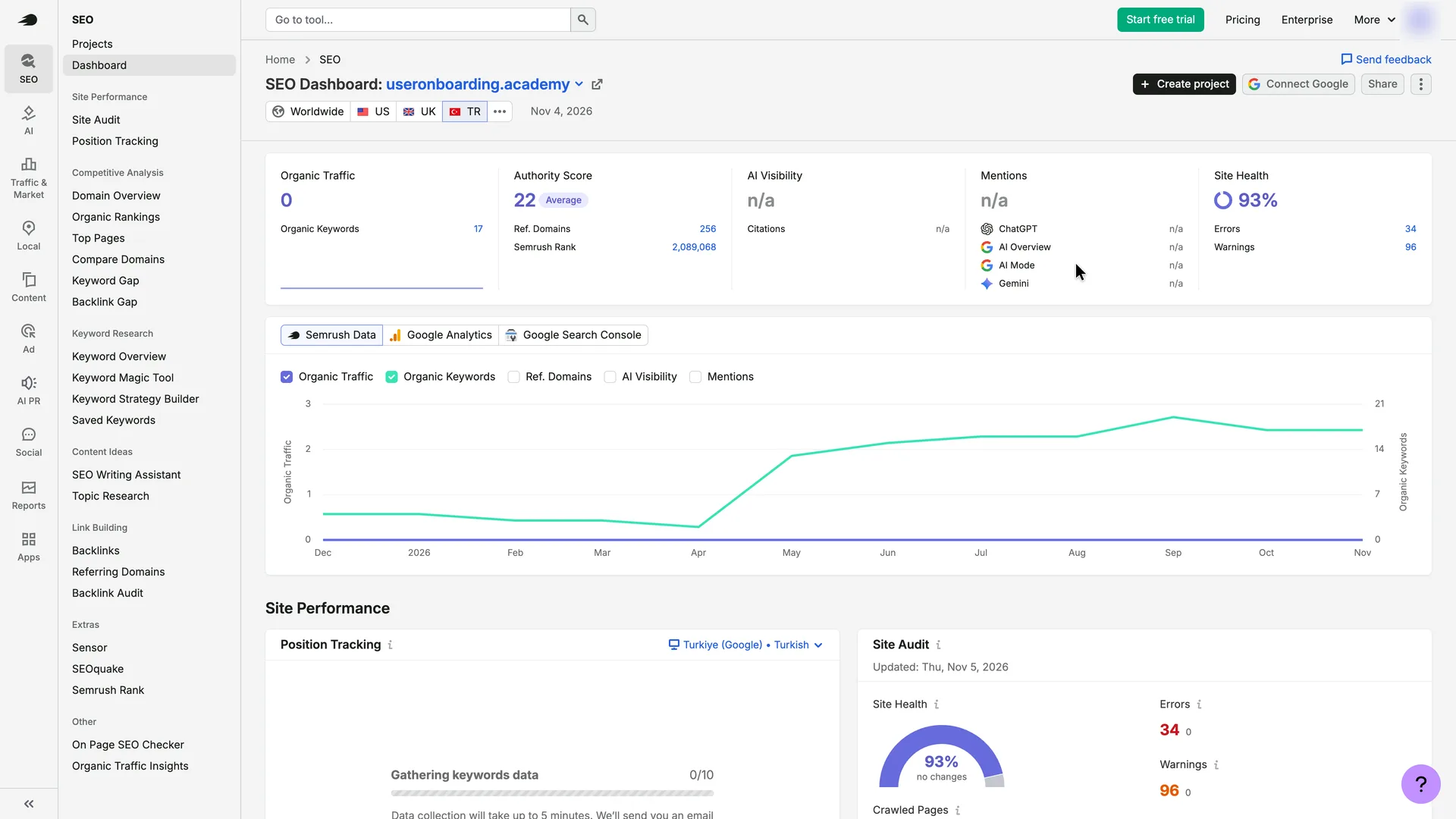
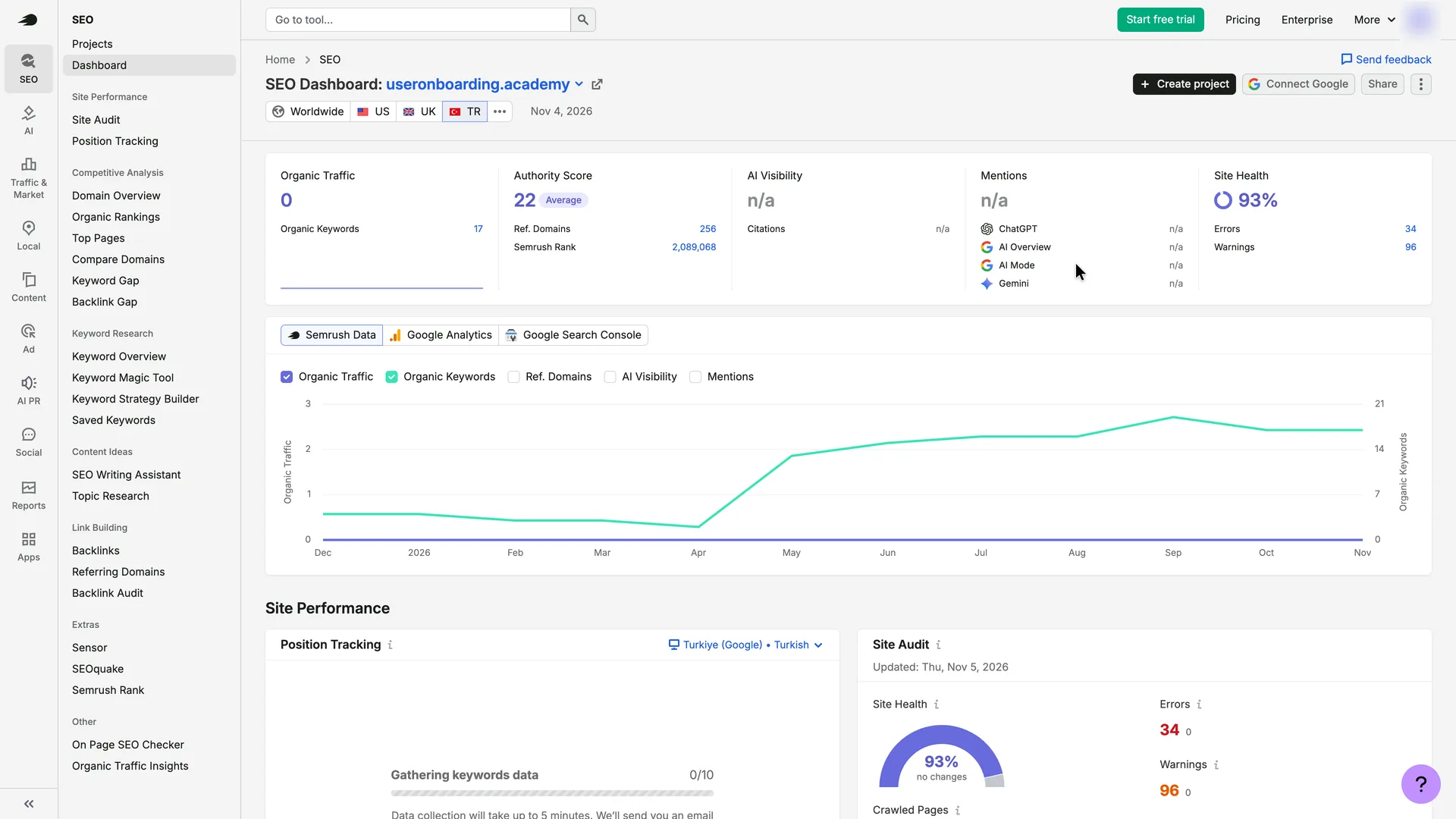
A dashboard of real data, set to a market Semrush picked for the site
Pressed the Site Health figure (93%)
Why it works
Creating the project ran the first reports without a single question: authority, keywords, backlinks and a 100-page site audit, all on the first screen. Semrush also chose the market for the reports itself, most likely from what it knows about the site: useronboarding.academy says on its About page that it is owned by a software company in Ankara, Türkiye. The recording browser was set to US English and connected from Portugal, so the visitor's location doesn't explain the choice.
What gets in the way
Nothing on screen says that Semrush picked the market for this site (Turkey, here), or why. The tabs let you switch, but a first-time user may read one country's numbers, including 0 organic traffic, as the site's whole picture.
What’s on this screen
'SEO Dashboard: useronboarding.academy' opened straight away, with database tabs Worldwide, US, UK and TR, TR selected for this site, and data dated Nov 4, 2026. Organic Traffic 0 with 17 organic keywords; Authority Score 22 (Average) with 256 referring domains and Semrush Rank 2,089,068; AI Visibility and Mentions n/a; Site Health 93% with 34 errors and 96 warnings. A chart plots organic traffic and keywords from December to November, with tabs for Google Analytics and Google Search Console. Position Tracking reads 'Gathering keywords data' (0/10) for Turkiye (Google), Turkish. The Site Audit had started on its own: moments earlier the Site Health box read 'Auditing site...' and the Site Audit card said data collection would take up to 5 minutes, with an email when finished. Further down: another Get free trial card and a competitor list led by Capterra Türkiye.
Step 11 of 11:First value
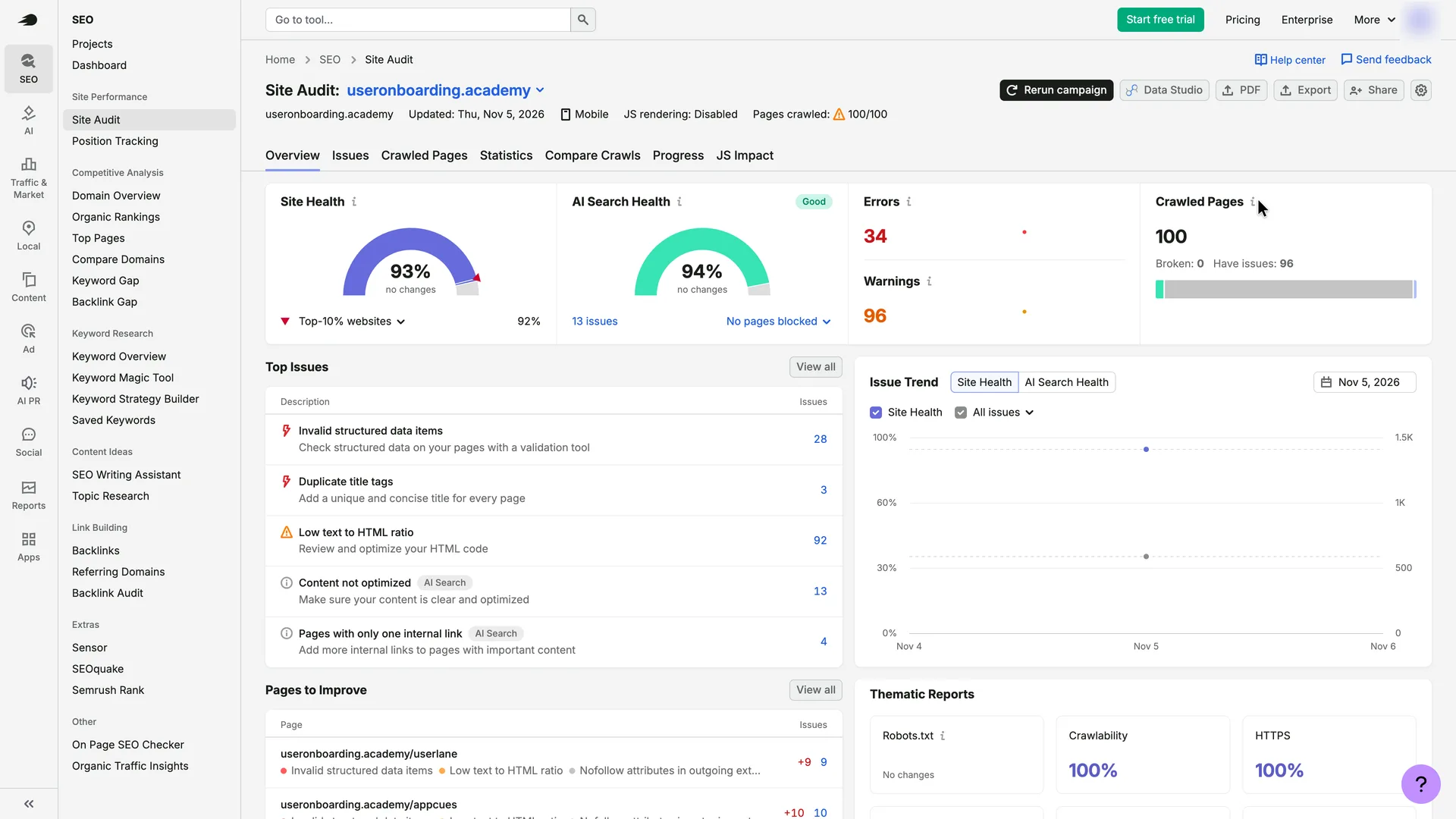
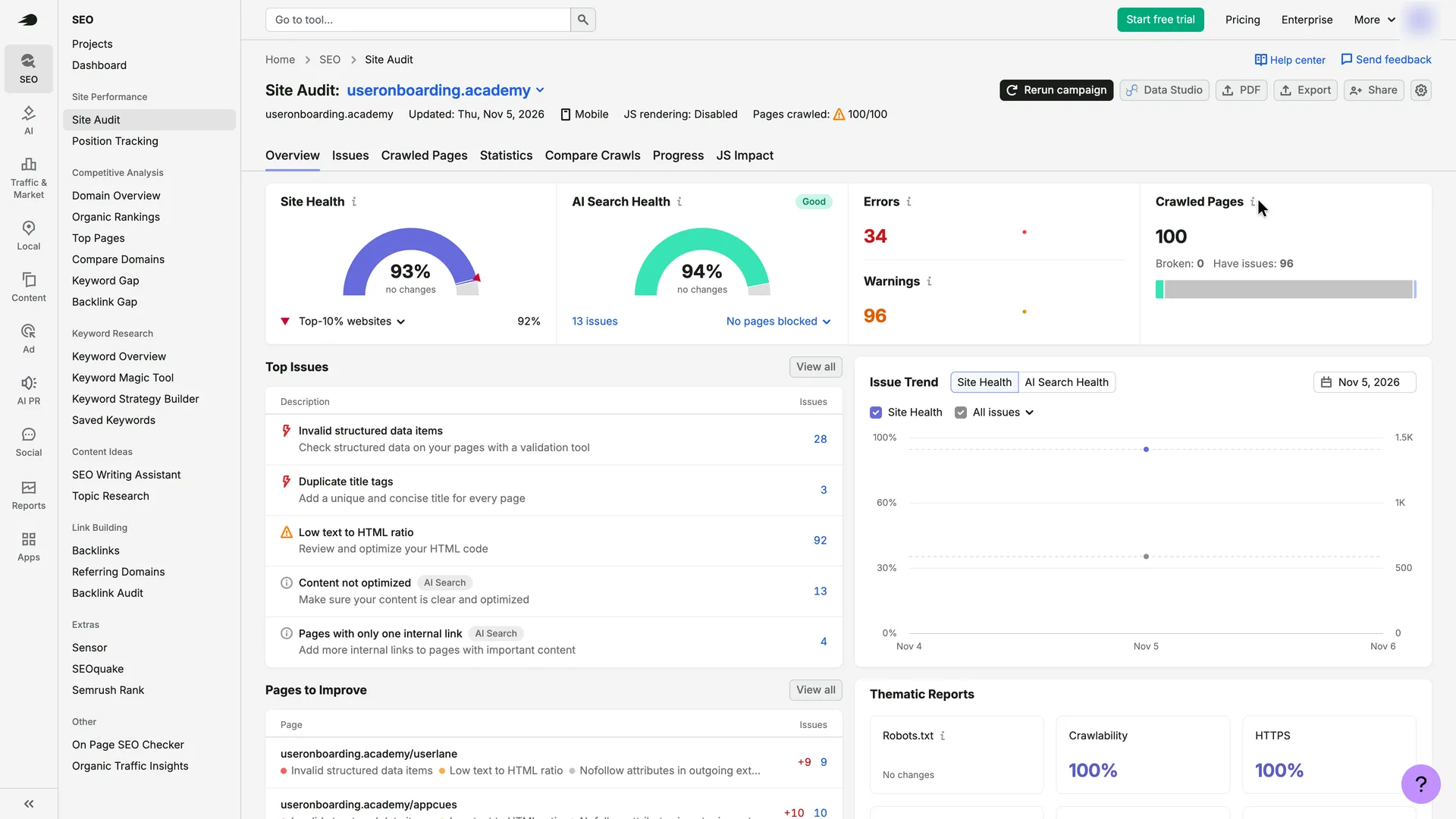
Site Audit: a health score and the top five issues
Stopped here: first value
Why it works
This answers 'what should I fix first': one score with a benchmark, then the five biggest issues, each with a page count and a plain instruction. It arrived without one setup question about the site.
What gets in the way
The warning sign beside 'Pages crawled: 100/100' gives no reason on this screen, and the crawl stopped at 100 pages although the site's sitemap lists 325 URLs.
What’s on this screen
'Site Audit: useronboarding.academy', updated Thu, Nov 5, 2026, Mobile, JS rendering: Disabled, and 'Pages crawled: 100/100' with a warning sign. Tabs: Overview, Issues, Crawled Pages, Statistics, Compare Crawls, Progress, JS Impact. Site Health 93% against 92% for 'Top-10% websites', AI Search Health 94% (Good) with 13 issues, Errors 34, Warnings 96, Crawled Pages 100 (Broken 0, Have issues 96). Top Issues lists Invalid structured data items (28), Duplicate title tags (3), Low text to HTML ratio (92), Content not optimized (13, tagged AI Search) and Pages with only one internal link (4, tagged AI Search), each with a one-line fix. Pages to Improve, Issue Trend and Thematic Reports (Robots.txt, Crawlability 100%, HTTPS 100%) fill the rest.
Verdict
What Semrush gets right
- The free plan is one click from the trial offer: Skip trial sits full width under Get free trial, and no payment details are asked for on either path.
- The password rules tick themselves off as you type, and the marketing-email box starts unticked.
- The email code submits itself on the sixth digit, and the screen mentions the spam folder before anyone has to ask.
- Setup is three one-click questions with progress dots, and every screen after the focus question was about the one focus chosen, SEO.
- Creating a project needs only a domain and runs the first reports by itself: authority, keywords, backlinks and a 100-page site audit with the top five issues, each with a one-line fix.
What we’d change
- Show where the website came from, and let people change it, before building a pitch on it. Semrush takes it from the email address; our agent, signing up for a made-up company with an email provider's address, got a 'best plan match' for the provider's site, and anyone using a personal or shared address would too.
- Say which market the reports are set to, and why. Semrush chose one for the site without a word, most likely from what it knows about the site (here, an owner in Ankara, Türkiye), so the first numbers covered a single country.
- Make the first screen in the app about the user's site. The SEO Toolkit's empty state is a headline, customer logos and two more trial buttons, straight after the user skipped a trial.
- Use the survey answers. After 'I need guidance for marketing tasks', no tour, checklist or tip appeared.
- Explain the crawl limit where it shows. 'Pages crawled: 100/100' carries a warning sign with no reason on the screen, on a site whose sitemap lists 325 URLs.
How we recorded it
- Recorded
- 5 Nov 2026
- Agent
- Claude Opus 5.5 in Claude Code
- Browser
- Chromium driven through Playwright MCP 0.0.84, a 1920 × 1080 window at 2× pixel density
- Signed up as
- Robin Hale, product manager at Quillmark (a made-up B2B SaaS company); a team of 26 to 50 people; wants a first SEO check of the company's marketing site: which Google searches find it and what to fix first
- Stopped at
- Got a first site audit of useronboarding.academy: Site Health 93% and the five issues to fix first
- Done by a person
- step 3, password, a newsletter box and Create account. An agent never accepts a product’s terms or gets past a verification on its own.
The agent answered every setup question as that person and skipped anything that would connect real data or invite real people. Screenshots are cropped to the part of the screen each step is about, and personal data in them is blurred. The figures at the top count the screens up to first value; form fields count every field shown, filled in or not.
Onboarding flows change, and this one is as Semrush showed it on 5 Nov 2026. Seen a different flow, or want this page corrected or removed? Write to hello@useronboarding.academy.
