Product Tour · 7 min read
7 Steps in the New Customer Onboarding Process Explained
The new customer onboarding process runs in seven steps: marketing, signup or first contact, a product walkthrough, the aha moment, a checklist for next steps, feedback, and a hand-over to ongoing support. Each step works only when it has a named owner, a time window and a signal that tells you it's done.
 By Selman Gökçe

In short
Seven steps take a new customer from first contact to a settled account. The table gives each step an owner, a time window and a "done when" signal, the part most process guides leave out. Real screens from Genially, Notion, FullStory, Jira, Memsource and Uizard show what each step looked like at the time of the screenshots (2022).
Most guides to the new customer onboarding process list the same steps: signup, welcome email, first login, walkthrough, follow-up. What they rarely say is who owns each step, how long it should take and how you know it's finished. Without those three, a step list is a wish list, and customers wait between steps because nobody was told the next one was theirs.
As an introvert, my first week at university was bearable because a volunteer guide showed me round the campus and filled me in on what I'd need later. A new customer onboarding process does the same job for a product: someone, or something, shows the customer round before they get lost.
What is the new customer onboarding process?
The new customer onboarding process is the sequence of steps that takes a customer from first contact to getting regular value from your product. It's one stage of the customer lifecycle, and it decides whether the customer finds the product worth keeping.
Customers who reach that value quickly tend to use the product regularly, and regular users are the ones who recommend it. That's why the process deserves a design of its own rather than whatever happens after the contract is signed. For the wider picture, including how customer onboarding differs from user onboarding, see our introduction to customer onboarding.
Who owns each step, and how long should it take?
Each step of the new customer onboarding process needs one owner, a time window and a signal that it's done. The table below is a starting point for a software product. The windows are suggestions, not benchmarks: set yours from how long your current customers actually take, which time-to-value tracking gives you.
| Step | Owner | Time window | Done when |
|---|---|---|---|
| 1. Marketing | Marketing | Before signup | The visitor signs up or requests a demo |
| 2. Signup or first contact | Product (self-serve) or sales (demo) | Minutes for a signup; a reply to a demo request within one business day | The account exists, or the demo is booked |
| 3. Product walkthrough | Product team | First session | The customer has done the core action once |
| 4. Aha moment | Product, with customer success for B2B accounts | First session to first week, depending on the product | The customer reaches the value point you defined |
| 5. Checklist for next steps | Product or customer success | First weeks | The checklist items are complete |
| 6. Feedback | Customer success | After the first milestone | A survey is answered or a check-in call is held |
| 7. Hand-over | Customer success, then support or account management | End of the onboarding period | The customer knows who to contact and how |
Two rules make the table work. A step without an owner is a step where customers wait. And a "done when" signal you can't see in your data is one you can't act on, so pick signals your product or CRM already records.
What are the 7 steps of the new customer onboarding process?
The seven steps run from the first marketing touch to the hand-over into ongoing support. Each one below says what to aim for, what to avoid and what a real product did at the time of the screenshot.
1. Marketing: where onboarding starts
Onboarding starts the moment a potential customer meets the product, which puts marketing first. Some teams treat setup as the beginning, but by then the customer has already formed expectations from your ads, website and case studies.
The goal of this step is a click on the signup button. Your marketing should make the product's purpose obvious enough that the visitor wants to try it, or read the success stories and use cases that convince them to.
Genially's homepage hero did this well at the time of the screenshot. The headline read "Creating interactive content is wow!", the buttons around it invited visitors to play before signing up, and the call to action said "Start now. It's free!". The product's purpose came across both visually and in words.
2. Signup or first contact
The second step is the start of the initial onboarding, usually a signup form or a demo request. A signup form means the product offers a free trial or free plan you can use straight away; a demo request means a team will contact you before you get access.
Whichever form it takes, two practices keep customers moving:
- Ask less, later. Some potential customers drop off when asked for too much too soon. Ask only what you need to create the account, and split profile questions across pages after signup.
- Offer one-click signup through a service they already use, such as Google, Slack or a social account, so they can get into the product without filling in a form.
Notion's signup page, at the time of the screenshot, offered "Continue with Google", "Continue with Apple", an email field and SAML SSO for companies.

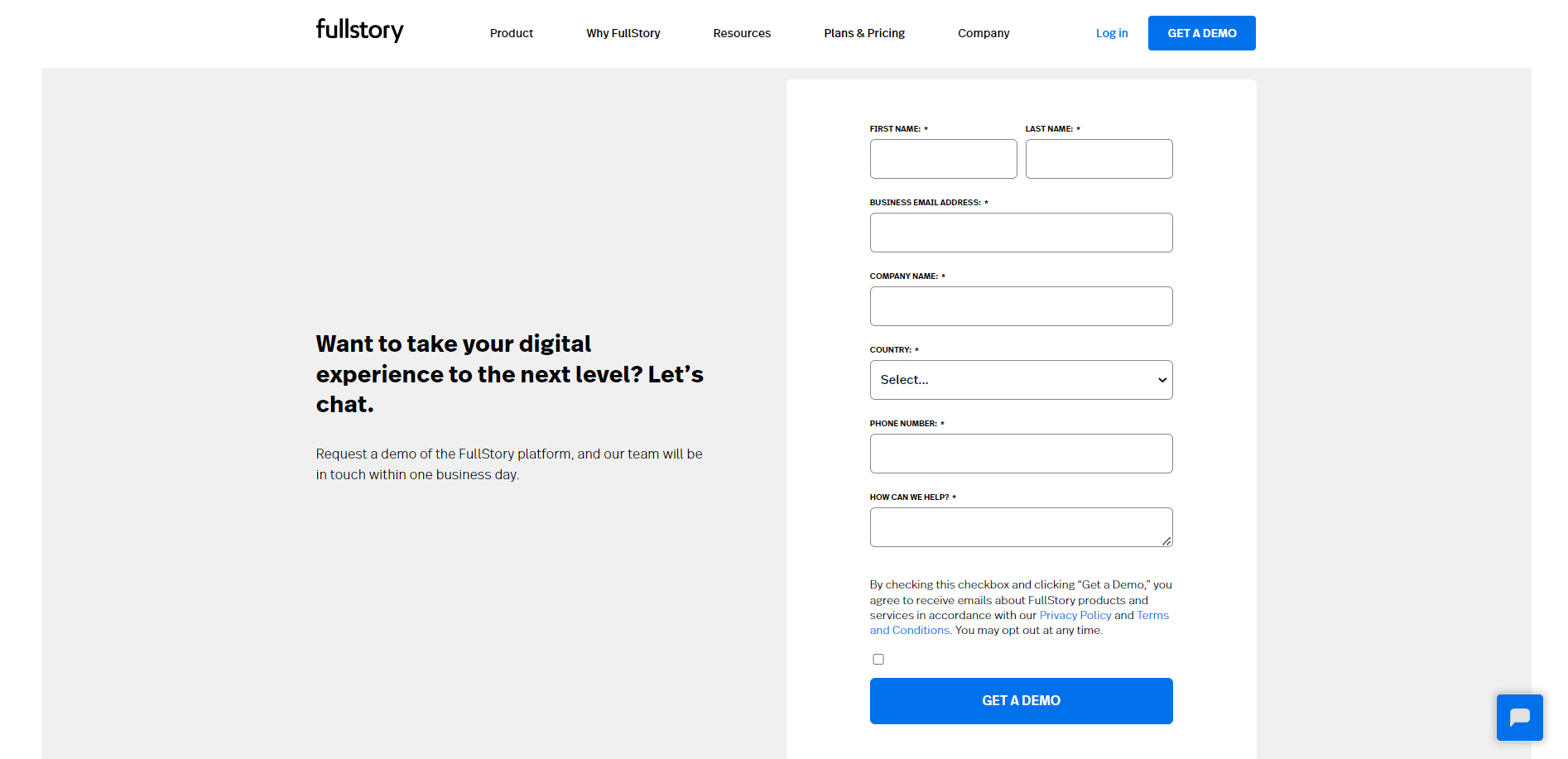
FullStory was one of the products that asked you to request a demo. Its form had seven required fields (first name, last name, business email, company, country, phone and a "How can we help?" box), and the page promised a reply within one business day: a time window the customer could hold it to.
3. Product walkthroughs and tours
For customers to get value from the product, they need to learn the parts that deliver it, and a walkthrough is the quickest way to teach them. Product tours help most with complex products, but they work in any product's favour when they guide customers to what they came for.
A walkthrough doesn't have to be elaborate. Many customers prefer a short process that explains the concept and the core features without tiring them, so cut every step that doesn't lead to the first result.
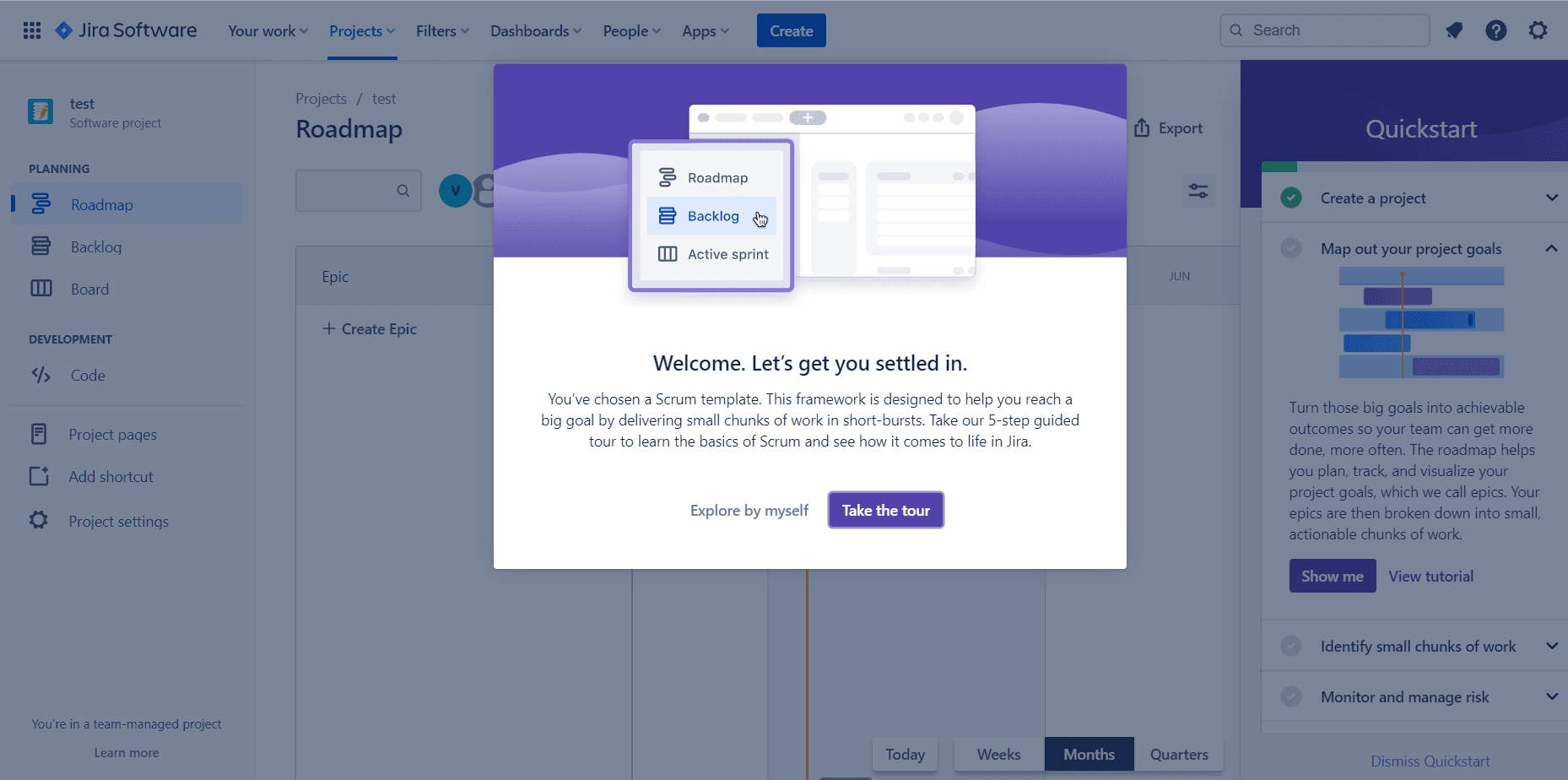
Jira paired the two at the time of the screenshot. After you picked a Scrum template, a welcome modal offered a "5-step guided tour" or the choice to "Explore by myself", while a Quickstart checklist on the right listed the next tasks: create a project, map out your project goals, identify small chunks of work. For more on building one, see how to create a product tour.
4. The aha moment
The aha moment is when customers realise the product can get them to their goal. They understand not only what the product does but what it can do for them, and engagement tends to rise from there.
Define the aha moment as an action you can see in your data, not a feeling. For a project tool, it might be the first project with tasks assigned to teammates; for a streaming service, the first show a new subscriber picks. Product owns the definition, and for B2B accounts customer success should confirm it with the customer, because their idea of value may be a business result rather than a click. Our guide to finding your aha moment goes deeper.
5. Checklists for the next steps
Once customers know what the product can do, an onboarding checklist pushes them towards the features they haven't tried yet. Checklists also track progress, so a customer who leaves halfway can pick up where they stopped.
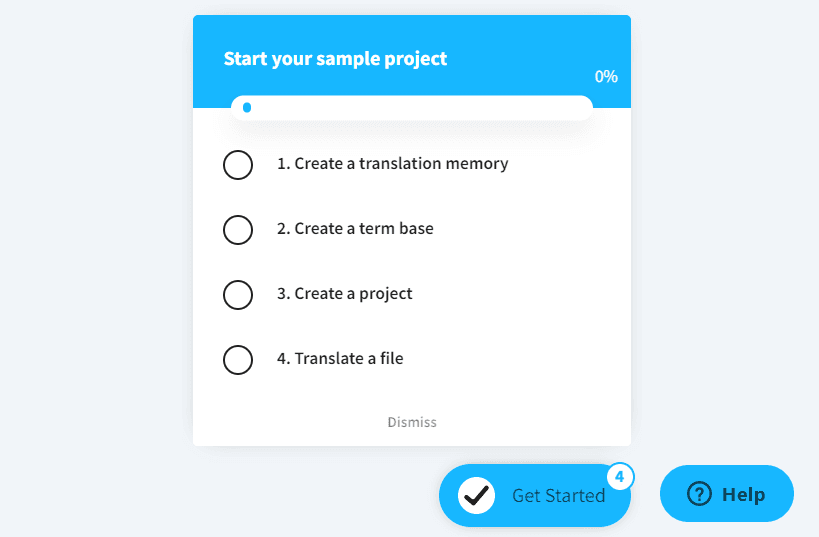
Memsource used a four-item checklist titled "Start your sample project" at the time of the screenshot: create a translation memory, create a term base, create a project, translate a file. Each item was a feature the customer needed for real work, there was a progress bar starting at 0%, and the list could be dismissed. More examples are in how to create product onboarding checklists.
6. Feedback on the onboarding
Your customer onboarding process might have all the steps above and still fail through a lack of empathy. Feedback shows the product and customer success teams the pain points, the places customers get stuck and what they like.
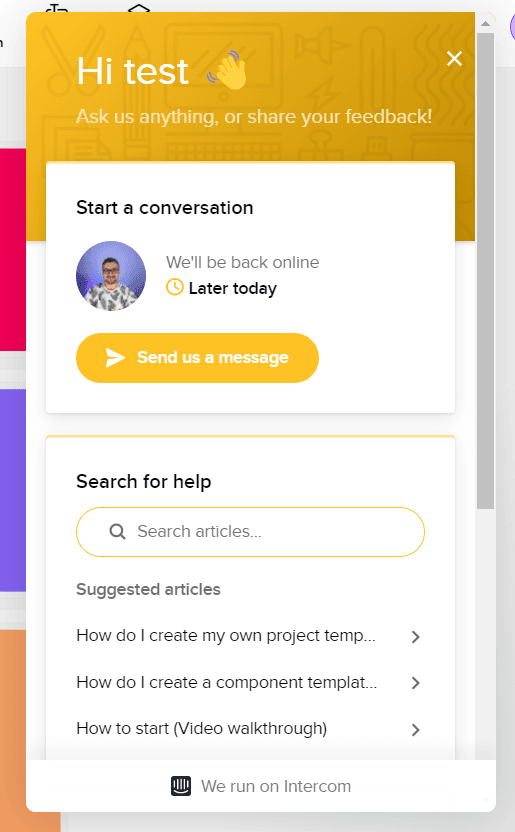
When feedback keeps naming the same reason for churn, fix that first: it's the cheapest way to keep the churn rate down. Uizard, at the time of the screenshot, opened its in-app messenger by greeting the user by name with "Ask us anything, or share your feedback!", next to a help search and suggested articles, so asking a question and giving feedback happened in one place.
7. Closing onboarding and handing over
The last step isn't about getting customers to use the product more. It's about showing them they can reach you when they need help, have a question or want something new.
Name the hand-over. Tell the customer when onboarding ends, who they'll deal with afterwards (support, an account manager or a self-serve help centre) and how to reach them. A customer who knows where help lives is easier to keep, and that shows up in the retention, activation and conversion figures you track.
How do you know the new customer onboarding process is working?
The process is working when customers move through the seven steps without waiting and the "done when" signals arrive on time. Watch three things:
- Time between steps. A long gap after signup or after the walkthrough points to a missing owner.
- Completion of the checklist in step 5, and which item customers abandon.
- Time-to-value, from signup or contract to the aha moment you defined in step 4.
The customer onboarding metrics guide covers how to measure each one, and how to onboard customers quickly covers what to cut from the first session once you know where customers stall.

About the author
Selman GökçeSelman is a creative content writer with a full focus on onboarding and everything it entails including UX, product, growth, and more.