Article · 4 min read
User Onboarding vs Employee Onboarding - What is the difference?
User onboarding teaches customers to get value from a software product; employee onboarding brings new hires into an organisation, its culture and their role. They differ in audience, owner, length and how success is measured. They overlap in one place: employees learning the internal software they need for their jobs, where user onboarding methods apply.
 By Aysenur Zaza
In short
User onboarding and employee onboarding differ in audience, goal, owner and length: customers and their first value on one side, new hires and their first months on the other. The two meet when employees have to learn internal software, which is the job digital adoption platforms are built for. G2 reviewers of Apty, an employee-focused tool, praise exactly that, while reviewers of customer onboarding tools praise ease of use first.
The word "user" causes half the confusion. In IT, "onboarding a user" means setting up a new employee's accounts and access. In HR, onboarding means bringing a new hire into the company. In software products, user onboarding means helping customers find value in the product, and that's what this site covers.
The terms sound alike, but they serve different people and need different approaches. The comparison most articles skip is where the two meet: employees who have to learn software, and the tools built for each side.
What is user onboarding?
User onboarding is the process of guiding people through their first steps with a product or service so they find its value. It's the virtual handshake: the orientation that introduces users to the features, workflows and overall experience of a piece of software, an app or an online platform.
The goal of user onboarding is higher adoption, engagement and satisfaction, by keeping confusion low and the product easy to use.
What does user onboarding include?
- Welcome messages and tutorials: a welcome message points users to the essentials, and interactive or video tutorials help them learn the product.
- Interface navigation: users learn how to move through the interface, with key buttons, menus and features highlighted so they can find what they need.
- Feature introductions: interactive tours, tooltips and step-by-step guides introduce the core features and the value they deliver.
- Feedback and support: chat support, help centres and FAQs answer questions quickly and give users a way to say what isn't working.
What is employee onboarding?
Employee onboarding is the process of integrating new hires into an organisation: their role, the company culture and how the organisation works. Its goal is a smooth transition, a sense of belonging, and the knowledge and tools a new employee needs to succeed.
What does employee onboarding include?
- Orientation and company introduction: like user onboarding, it starts with a welcome, but the focus is the company's mission, vision, values and structure. Onboarding vs training vs orientation explains how orientation fits in.
- Job training and skill development: training on the technical and soft skills the role needs.
- Policies and compliance: company policies, procedures and legal requirements, so expectations and rules are clear.
- Mentorship and social integration: mentors, team activities and social events that connect new hires with colleagues.
What is the difference between user onboarding and employee onboarding?
User onboarding is for external users and succeeds when they reach value and keep using the product; employee onboarding is for new hires and succeeds when they're productive and stay. The differences run through every part of the process:
| User onboarding | Employee onboarding | |
|---|---|---|
| Audience | External users: customers, clients, subscribers | New hires joining the organisation |
| Objective | Adoption, engagement and satisfaction with a product | Integration into the culture, skills for the role, belonging |
| Content | Features, workflows and the product's value | Culture, policies, role-specific training and skills |
| Duration | Short to first value, then ongoing as features ship | The first weeks or months of the job |
| Relationship building | A first impression that earns continued use | Relationships and collaboration inside the organisation |
| Usually owned by | Product, growth and customer success teams | HR and the hiring manager |
| Typical tools | In-app guidance tools, email, help centre | HR systems, learning platforms, digital adoption platforms |
The time scales show the gap most clearly. Employee onboarding is often planned as a 30-60-90 day plan, with goals for a new hire's first, second and third month. User onboarding works in minutes and sessions, because a customer who doesn't see value can leave at any point without telling anyone.
Where do user onboarding and employee onboarding overlap?
They overlap when employees have to learn software. A new hire learning the company's CRM is a user being onboarded, and the methods of user onboarding (tours, tooltips, checklists, in-app help) apply to them too. Tools built for this job are usually called digital adoption platforms.
The tools' own reviewers draw the line between the two markets. Among the G2 reviews we read on 19 October 2026, 78 of 147 reviews of Apty praised employee and internal-software adoption. For Appcues and Userflow, that theme wasn't among the three most praised; their reviewers led with ease of use (186 of 294 and 99 of 125 reviews).
So before you choose a tool, check which audience it was built for. The digital adoption platforms guide covers the employee side.
What are examples of user onboarding and employee onboarding?
User onboarding examples
1. Netflix
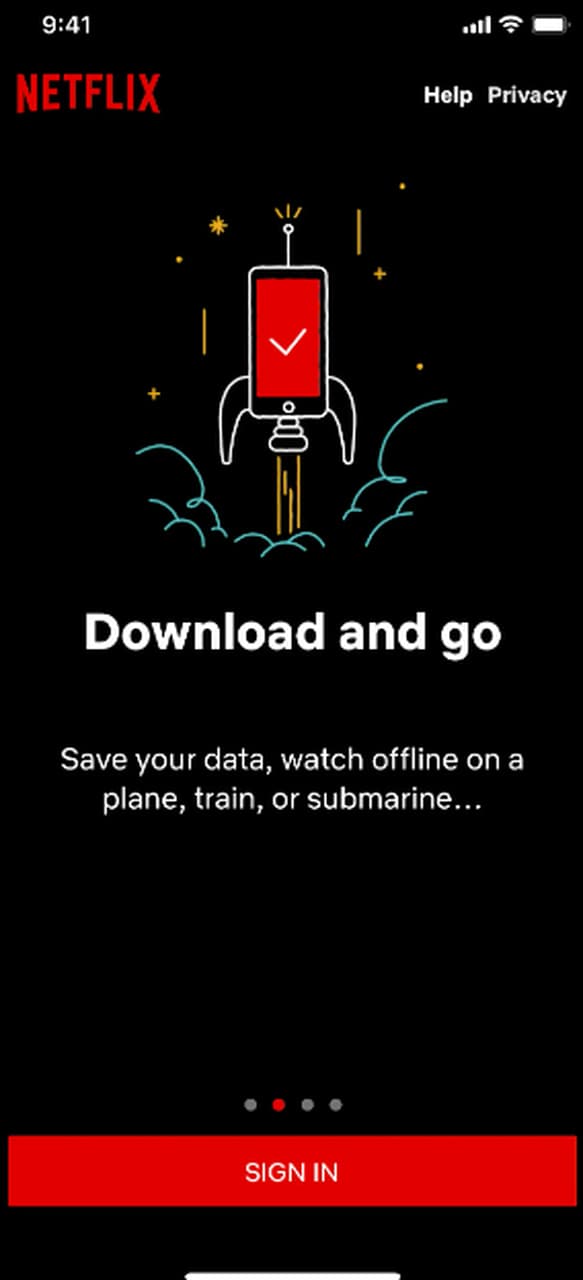
Netflix's onboarding acts as a guide to a large library. At the time of the screenshot, the app opened with a short welcome carousel, then new viewers created a profile and set their preferences before browsing. The Netflix signup flow in our inspirations library shows the steps.
2. Duolingo
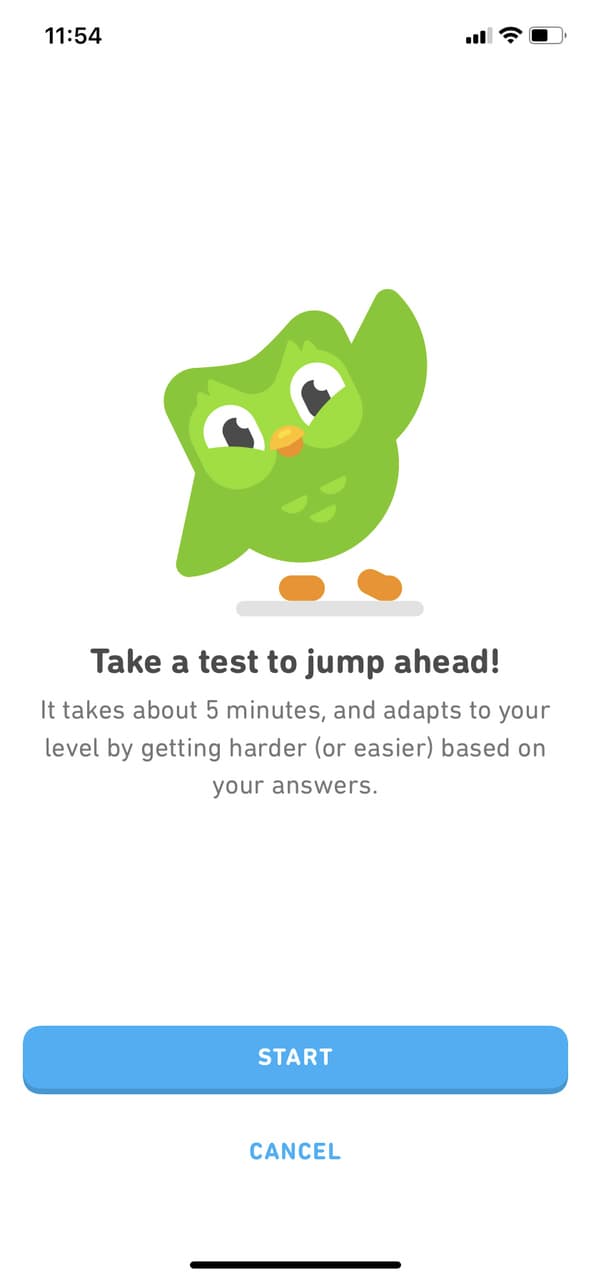
Learning a language can feel daunting, and Duolingo's onboarding turns it into a game. At the time of the screenshot, learners could take a placement test that adapted to their answers and skip ahead, then continue with bite-sized lessons, progress tracking and rewards that keep them coming back.
Employee onboarding examples
1. Google
Google welcomes new hires, whom it calls "Nooglers", with an onboarding programme built around its culture. New employees learn the company's history and values alongside the training for their role, so they arrive at their desks informed and connected.
2. Zappos
Zappos is known for building its onboarding around its company culture. New hires learn the core values and the company's approach to customer service early on, before they settle into their roles.
These examples show the split. User onboarding focuses on intuitive navigation and immediate value; employee onboarding focuses on cultural immersion and long-term development. Design each for its own audience, and when your audience is employees learning software, borrow from both.

About the author
Aysenur ZazaAysenur Zaza is a creative content writer and an avid researcher when it comes to product, growth and everything SaaS.