Tooltip
Zoom’s in-app slideout modal feels exclusive
Zoom promotes an upgrade discount in a small slideout card on its account pages, with a short offer, a deadline and a Get Offer link.
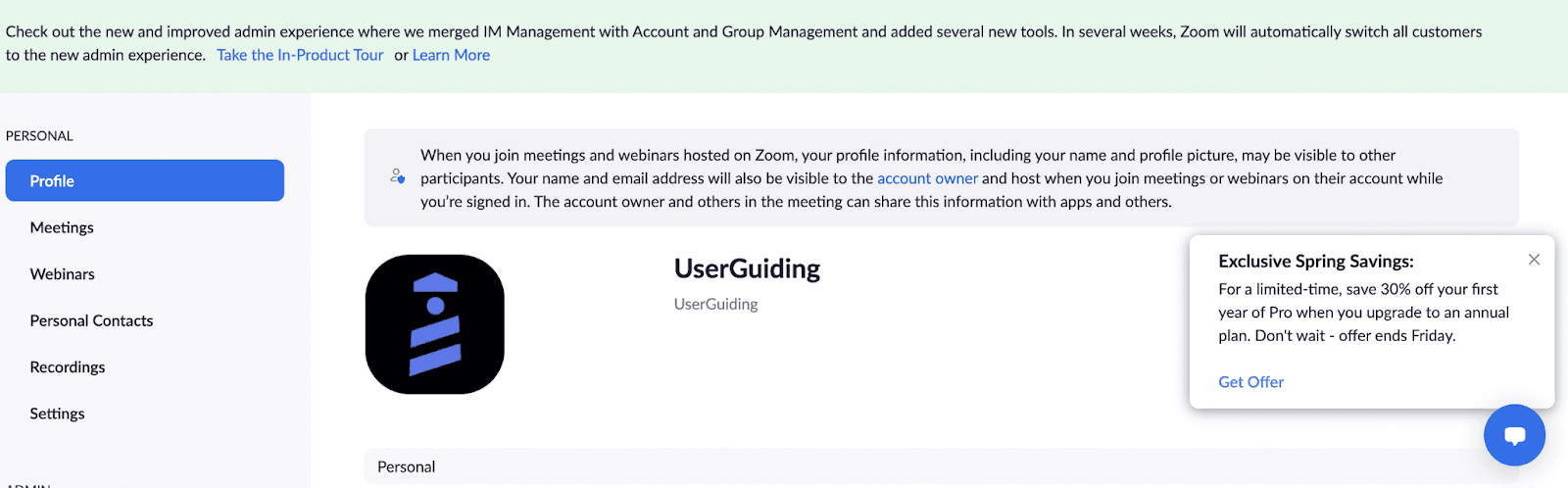
Zoom uses a slideout modal to promote a discount to signed-in users. At the time of the screenshot, a small card in the corner of the profile page is headed "Exclusive Spring Savings" and offers 30% off the first year of Pro on an annual plan, with a deadline ("offer ends Friday"). A blue "Get Offer" link and a close button are the only controls, and the page underneath stays fully usable.
Why it works
- Non-disruptive: the card is small and sits in a corner, so it doesn't interrupt whatever you came to the page for, and it closes with one click.
- Short copy with a clear action: the offer is three short sentences without heavy formatting, and "Get Offer" says exactly what the link does.
- Feels exclusive: shown inside the account rather than on a public page, and headed "Exclusive", the deal reads as something meant for you specifically.
More on this pattern: how companies use UI modals and types of onboarding UX, including announcements.