Hotspot · Contextual help
World of Wonders’ hotspots make the game easier to navigate
World of Wonders, a mobile game, marks menus and tabs worth checking with small red hotspots instead of tooltips or modals.
Screenshot added to the library in October 2022; its exact capture date wasn’t recorded, and the product may look different today. Write-up reviewed 22 Oct 2026.
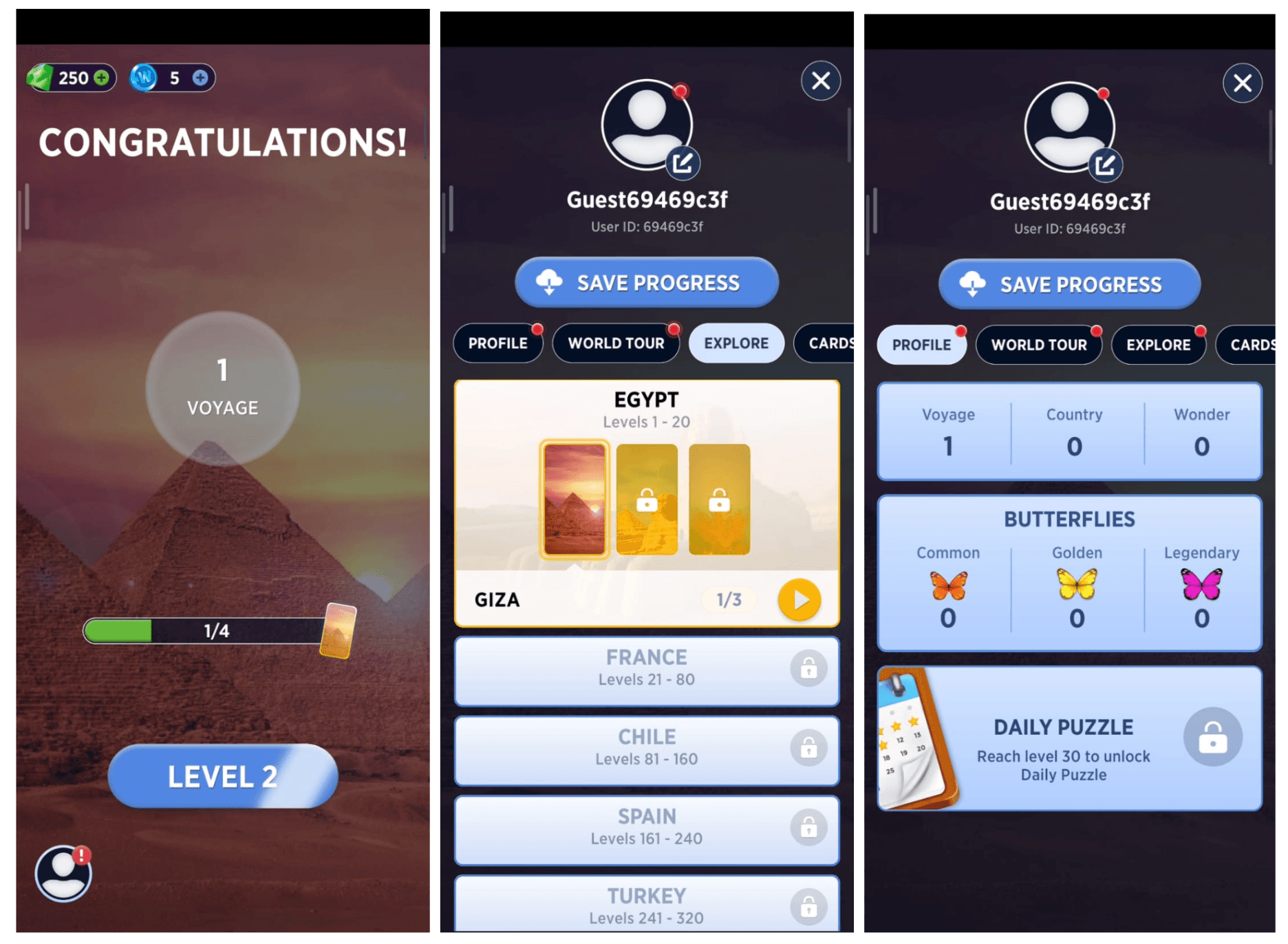
World of Wonders is a mobile game with a lot of menus and widgets. At the time of the screenshot, it helped new players find their way with hotspots: small red dots on whatever was worth a look. After the first level's "Congratulations!" screen, a red badge sits on the profile icon. Inside the profile, red dots mark the Profile, World Tour and Explore tabs and the avatar, pointing players to things like saving their progress and the list of destinations still to open up.
Why it works
✅ The right pattern: a hotspot is a reminder, not a lesson. For "there's something new here", a dot does the job without a tooltip or a full modal.
✅ Not annoying: the dots are small and rely on colour contrast (red against the game's blue panels) to stand out, rather than demanding attention.
✅ Not overdone: the dots appear on a handful of entry points rather than every button, so the menus stay organised and each dot still means something.
More on this pattern: UX/UI hotspots and mobile app onboarding.