Slideout · Feature discovery
Spotify’s new feature is introduced as frictionless as possible
Spotify introduces Smart Shuffle inside the menu that opens from the shuffle button, with a New label, one line of copy and a Learn more link.
Screenshot added to the library in March 2023; its exact capture date wasn’t recorded, and the product may look different today. Write-up reviewed 22 Oct 2026.
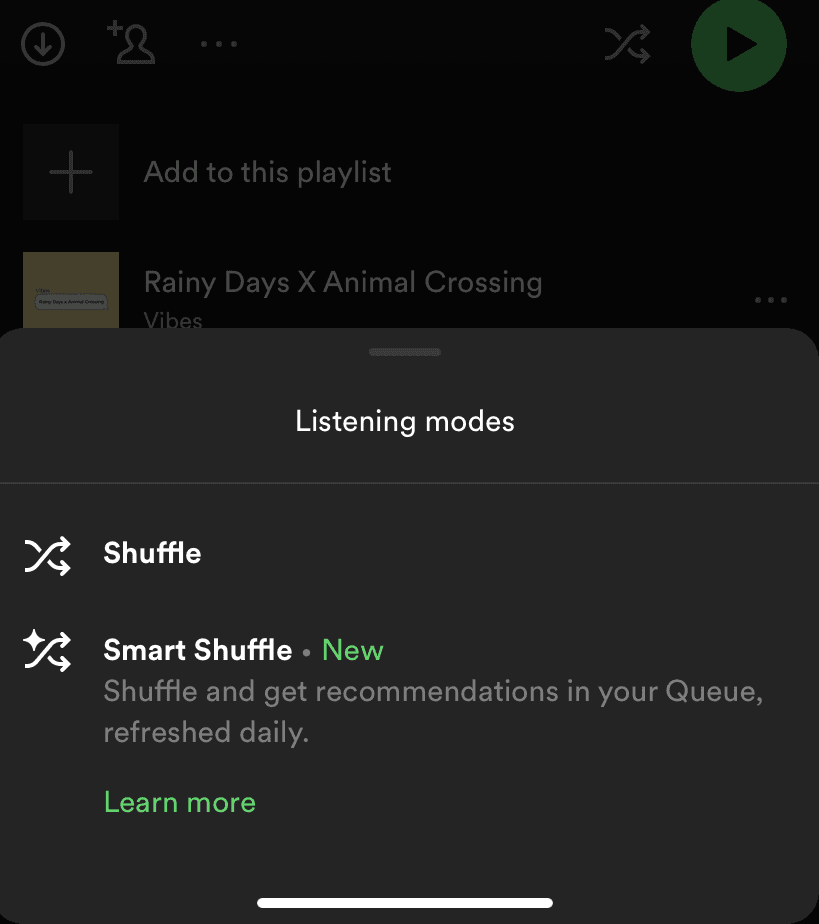
Spotify introduced Smart Shuffle without a pop-up at all. At the time of the screenshot, tapping the shuffle button on a playlist opens a slideout modal titled "Listening modes" with two choices: the regular Shuffle and "Smart Shuffle", followed by a green "New" label. One line of grey microcopy explains the new mode ("Shuffle and get recommendations in your Queue, refreshed daily"), and a green "Learn more" link sits below.
Why it works
- Minimum friction: the announcement lives in a menu you opened yourself, at the moment you wanted to shuffle, so it doesn't feel like onboarding at all. The explanation is one quiet line you read because you're choosing anyway.
- Design that points without shouting: Spotify's own green marks only the "New" label and the link, which is enough to draw the eye to the new option while keeping the sheet calm.
More on this pattern: new feature onboarding and contextual onboarding.