User onboarding
Notion’s initial onboarding is a checklist you complete on the page
Notion onboards new users with a Getting Started page: a checklist of basics that users tick off by trying each one on the page itself.
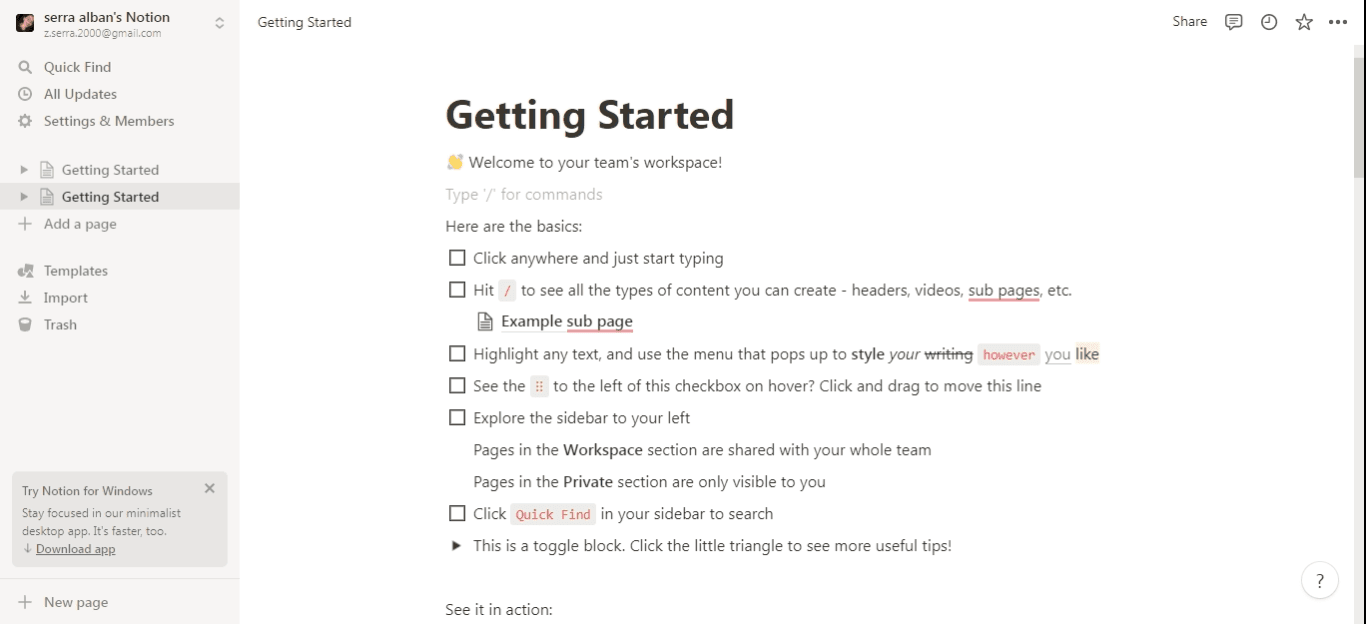
Instead of a user manual or an interactive guide, Notion onboarded new users with a page of its own kind. At the time of the screenshot, a new workspace opened on "Getting Started", a Notion page that works as an onboarding checklist. Under "Here are the basics:" each tick box names one thing to try: click anywhere and type, hit "/" to see content types, highlight text to style it, drag a line by its handle, explore the sidebar, use Quick Find. A toggle block at the end hides more tips.
Why it works
✅ Simple yet informative: each item is one line, but together they cover what a new user needs for their first few sessions.
✅ True to the brand: the onboarding is built from Notion's own blocks (checkboxes, a sub-page, a toggle), so learning about the page teaches the product at the same time.
✅ Easy to come back to: most onboarding happens once and disappears. This checklist is an ordinary page in the sidebar, there until the user deletes it.
More on this pattern: user onboarding checklists and first-time user experience.