Checklists
Navattic’s first-time user onboarding wizard is perfectly planned
Navattic's getting-started checklist sits at the top of the dashboard with a progress bar, a time estimate for each step and options to collapse or dismiss.
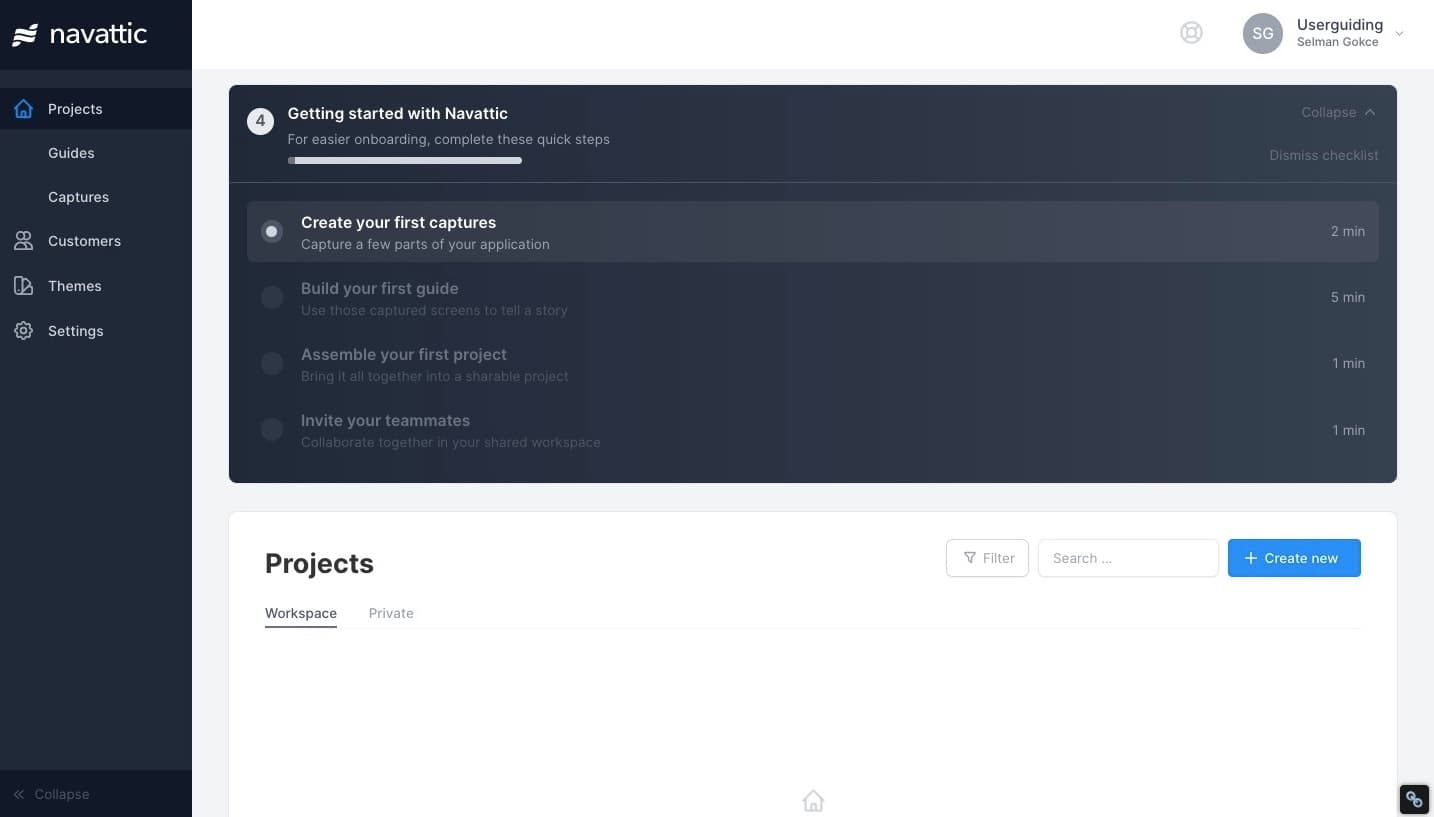
At the time of the screenshot, Navattic onboarded first-time users with an onboarding checklist (a wizard of setup tasks) in a dark panel at the top of the Projects page: "Getting started with Navattic. For easier onboarding, complete these quick steps". It lists four steps, each with a one-line explanation and a time estimate: create your first captures, build your first guide, assemble your first project and invite your teammates. A counter, a progress bar, and Collapse and Dismiss checklist links complete it.
Why it works
✅ Visual hierarchy: the checklist sits at the top of the screen in a dark colour that contrasts with the light dashboard, so it's the first thing a new user sees.
✅ Progress indicators: the progress bar, the number of steps and the minutes each one takes (from one to five) tell users exactly how much effort is left, which makes starting easier.
✅ Dismissable: the Collapse and Dismiss checklist options let users put it away and come back later, which takes the pressure off.
More on this pattern: product onboarding checklists and user onboarding checklists.