Slideout · Contextual help
Impulse’s slideout modal teaches how to close ads
Impulse uses a slideout modal to warn users about ads before they see one, showing the skip buttons to look for and when they appear.
Screenshot added to the library in October 2022; its exact capture date wasn’t recorded, and the product may look different today. Write-up reviewed 22 Oct 2026.
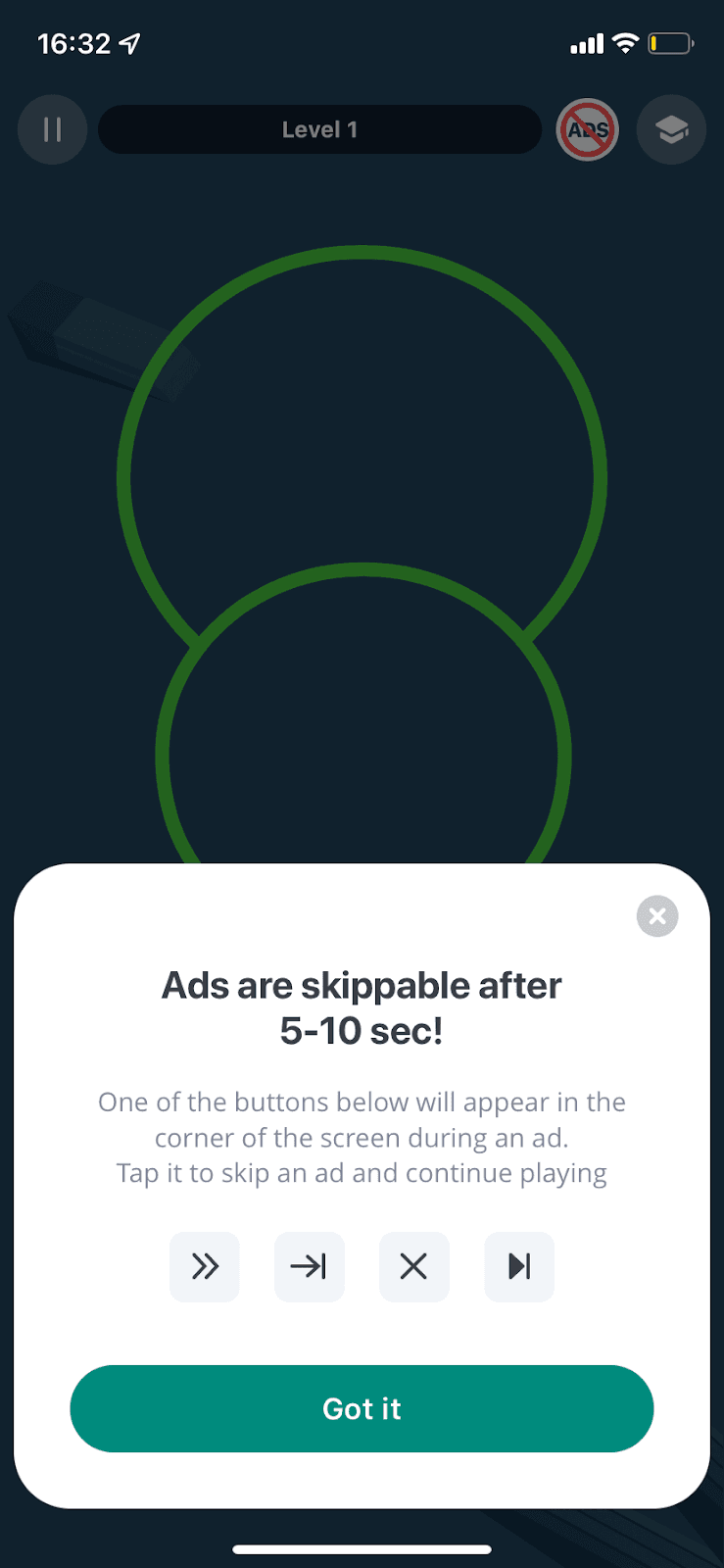
At the time of the screenshot, the Impulse mobile app showed a slideout modal over the first level, explaining its ads before users ran into one. The headline reads "Ads are skippable after 5-10 sec!". Below it, a line of copy explains that one of the buttons pictured will appear in the corner of the screen during an ad, and that tapping it skips the ad. Four example skip and close icons follow, then a Got it button.
Why it works
✅ Thoughtful: few apps help users get through their ads. Showing the skip buttons in advance means users who aren't used to ads won't get confused and leave the app.
✅ Not too disruptive: the slideout covers only the lower part of the screen, so the game stays visible behind it.
✅ The key fact in the headline: putting "skippable after 5-10 sec" in the title means even users who dismiss the modal quickly learn that ads won't hold them for long.
More on this pattern: UI modals and mobile app onboarding.