
User Onboarding
HubSpot’s step by step setup makes setup easier
HubSpot's domain hosting setup is a three-stage wizard with a progress bar, collapsible numbered steps and a link to skip straight to DNS records.
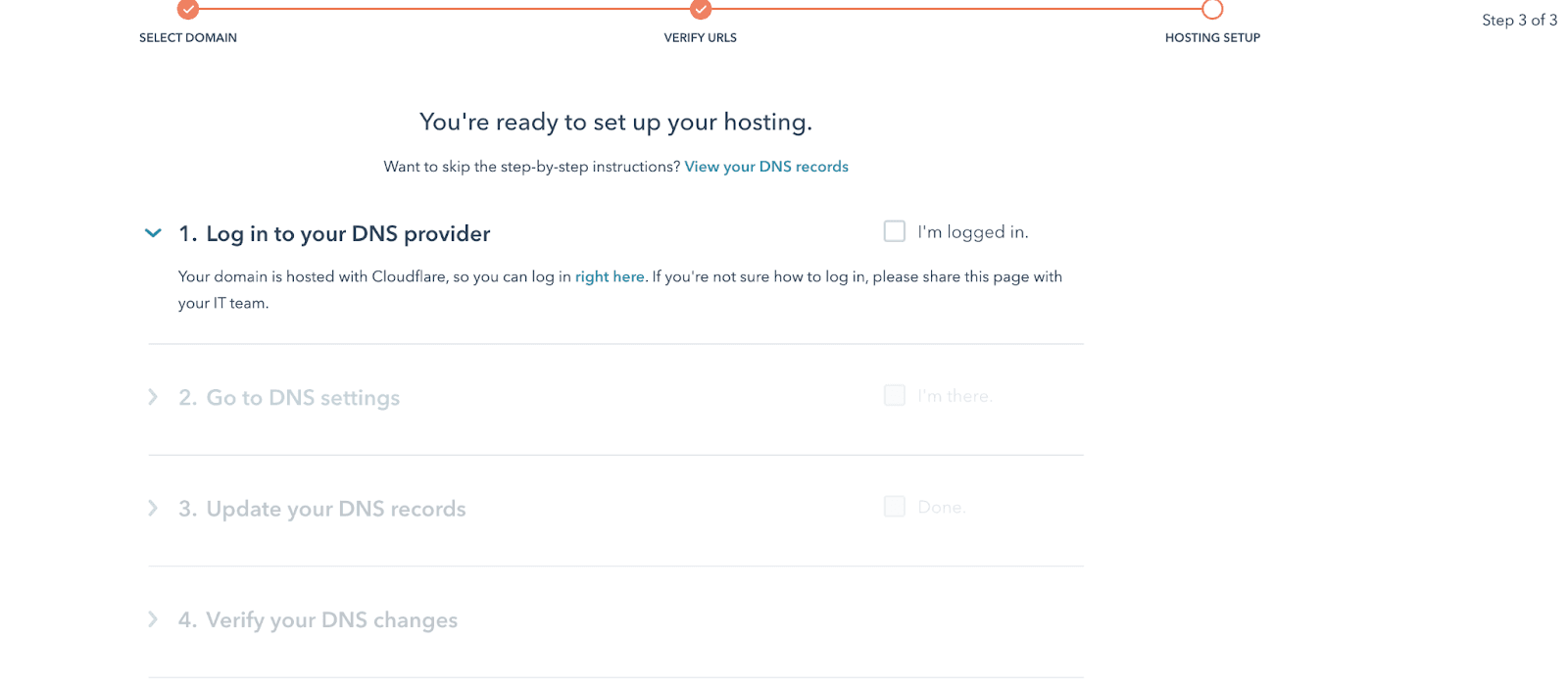
HubSpot turns connecting a domain into a setup wizard. At the time of the screenshot, a progress bar across the top shows three stages (Select domain, Verify URLs, Hosting setup) and the user is on step 3 of 3: "You're ready to set up your hosting." Below, four numbered steps open one at a time, from logging in to your DNS provider to verifying your DNS changes. Each step has short instructions and a checkbox to confirm it ("I'm logged in.", "I'm there.", "Done."). A line under the heading offers a shortcut: "Want to skip the step-by-step instructions? View your DNS records".
Why it works
- Short and simple: a technical task is cut into three stages and four small steps, and only the current step is open, so there's never much to read at once.
- Clear, specific instructions: the first step already knows the domain is hosted with Cloudflare and links straight to its login, with a fallback ("share this page with your IT team") for anyone who can't log in.
- Skippable, knowingly: people who already know DNS can jump to the records, and the link says exactly where it goes, so nobody skips by accident.
More on this pattern: onboarding user flows and SaaS onboarding best practices.


