User onboarding
Grammarly’s personalization modal is a lifesaver
Grammarly's personalisation step asks users what they want help with, next to an example of a suggestion, and lets them skip if they'd rather not say.
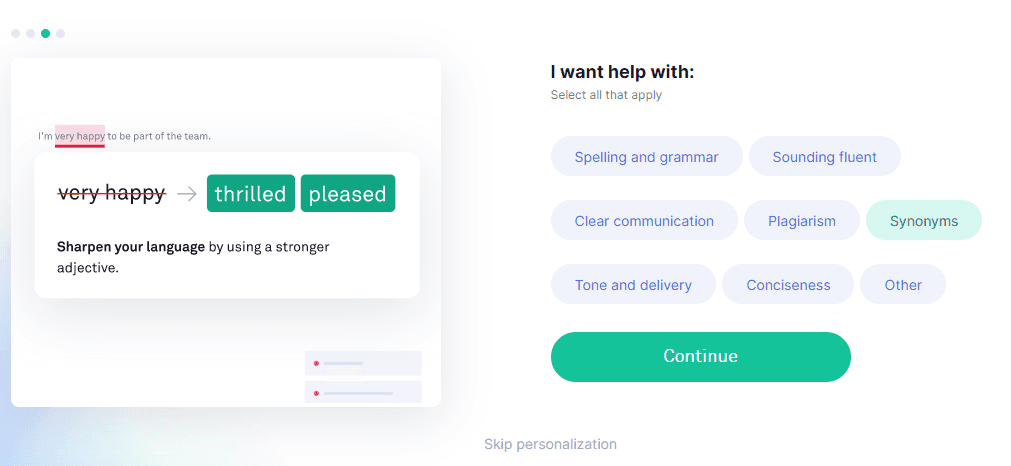
At the time of the screenshot, Grammarly showed users a personalisation modal that asks "I want help with:" and lets them select all the topics that apply: Spelling and grammar, Sounding fluent, Clear communication, Plagiarism, Synonyms, Tone and delivery, Conciseness or Other. On the other side, an example shows a Grammarly suggestion at work ("very happy" replaced by "thrilled" or "pleased" to sharpen your language). A Continue button and a Skip personalization link sit below.
Why it works
✅ Personalised experience: the modal openly asks how the user wants to use Grammarly so it can make the experience more relevant, and the user can skip it. The answers also tell Grammarly which features matter most to its users.
✅ Visual support: the example on the side shows how a suggestion works, which helps visual learners and makes the step more engaging for everyone else.
✅ A reminder of what the tool can do: although its job is personalisation, the list of topics also shows users, some for the first time, how much Grammarly covers beyond spelling.
More on this pattern: personalised onboarding and UI modals.