Tooltip
Genshin Impact’s tooltip explains a new shortcut easily
Genshin Impact points out a new party shortcut with one tooltip and a glowing highlight around the party list, without pausing the game.
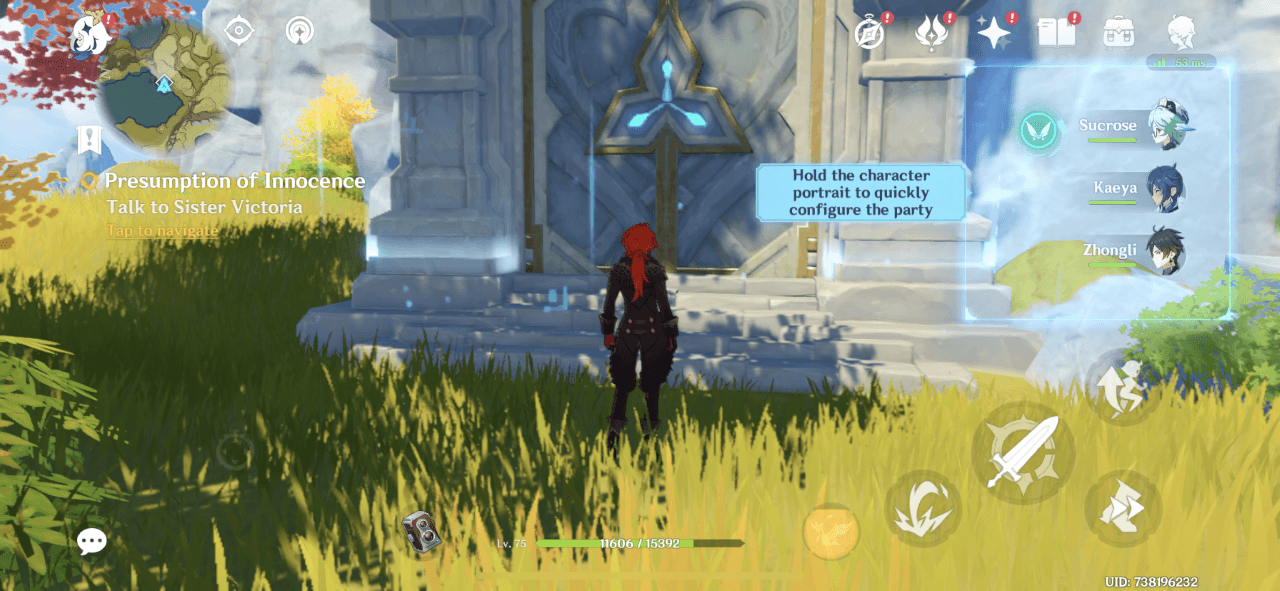
Genshin Impact introduces a new shortcut with a single tooltip and a highlight. At the time of the screenshot, a pale blue tooltip reads "Hold the character portrait to quickly configure the party", and a glowing frame surrounds the party list of character portraits on the right of the screen. The rest of the game stays live and playable around it. There's no skip or close button on the tooltip.
Why it works
- One sentence for a real change: the shortcut changes how players manage their party, yet the explanation is a single line that says what to hold and what it does.
- Almost no interruption: no modal or banner, just one tooltip, so the game carries on behind it. The only catch is the missing close button.
- A highlight that does the pointing: the glowing frame marks exactly which part of the screen the tooltip is about, so the copy doesn't need to describe where the portraits are.
More on this pattern: tooltips in web design and contextual onboarding.