
Onboarding
Expensify’s sign-up onboarding is unexpectedly fun for a financing app
Expensify’s mobile sign-up runs through Concierge, a chat-style assistant that asks a few illustrated questions to segment new users.
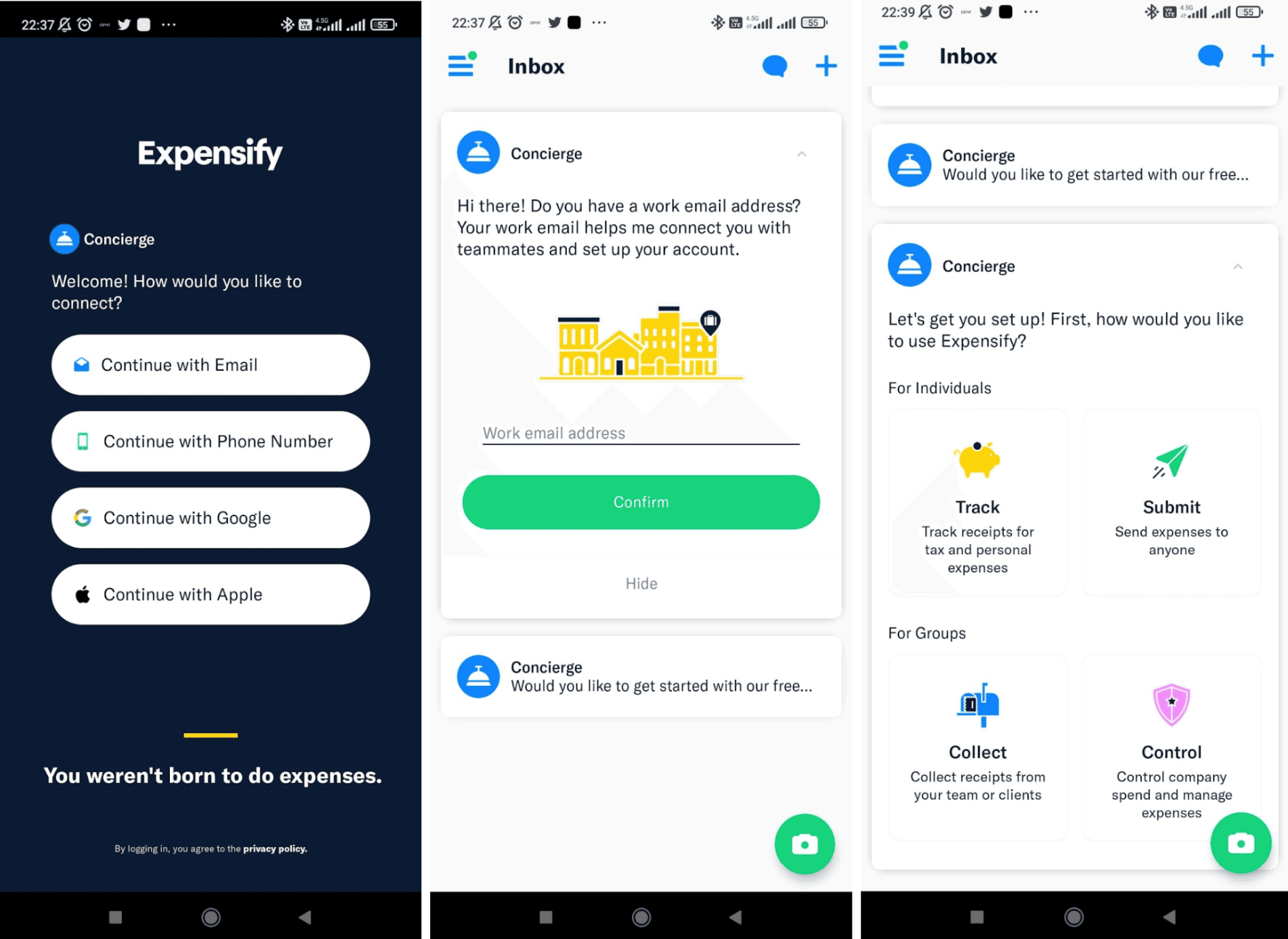
At the time of the screenshot, Expensify’s mobile app ran its sign-up flow through Concierge, an assistant that talks to new users in the app’s Inbox. The welcome screen asks "How would you like to connect?" (email, phone number, Google or Apple) under the line "You weren’t born to do expenses." Concierge then asks for a work email, beside an illustration of a city street, and next asks how the user wants to use Expensify: Track or Submit for individuals, Collect or Control for groups, each with its own illustration.
Why it works
- A friendly guide: setting up the account through Concierge messages feels like being looked after at a front desk, not filling in a form, which is unexpected for an expenses app.
- Visuals: each step has a small, colourful illustration, so moving to the next question feels light.
- Limited options and good copy: four clear choices per question keep the flow moving, and the short, friendly lines greet newcomers warmly.
More on this pattern: mobile app onboarding and personalised onboarding.


