Tooltip · Feature discovery
Evernote’s contextual onboarding uses videos to explain
Evernote's mobile app points a tooltip at the Task option in its insert menu, explains what tasks do and offers a Show me button.
Screenshot added to the library in February 2022; its exact capture date wasn’t recorded, and the product may look different today. Write-up reviewed 22 Oct 2026.
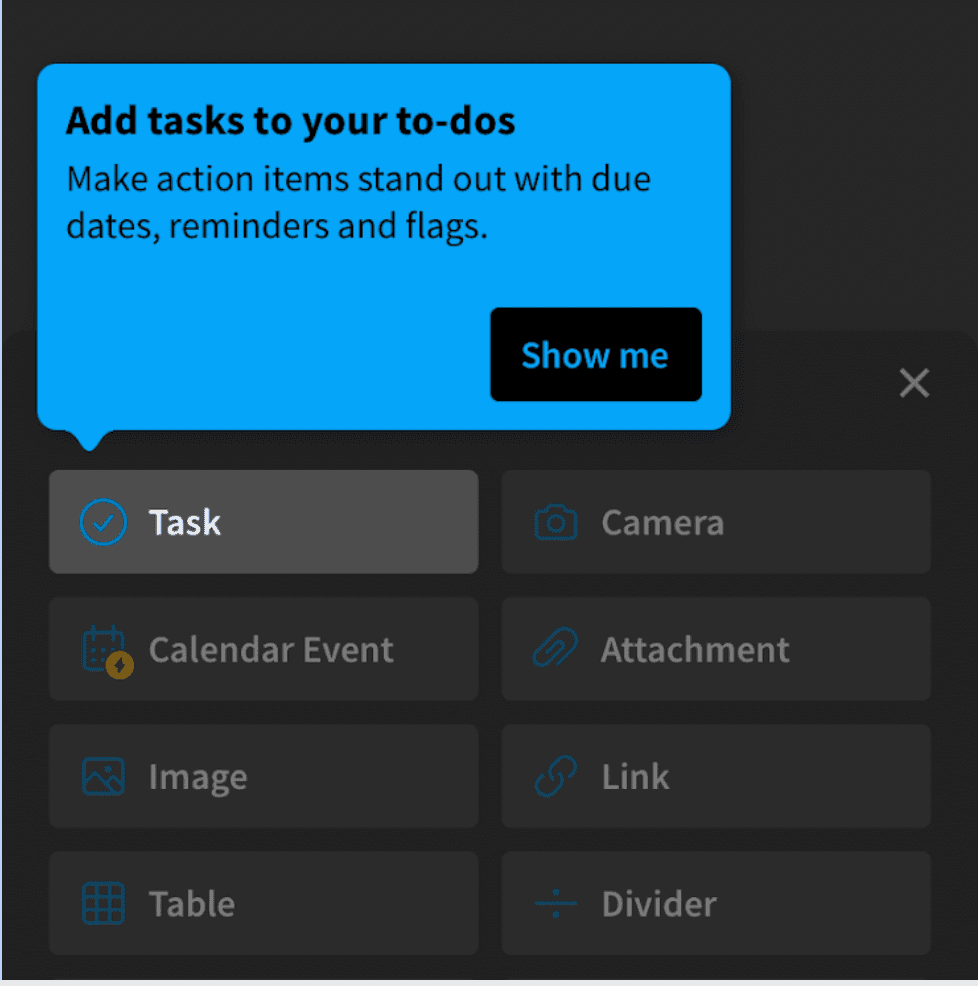
Evernote's mobile app introduces tasks with a contextual tooltip. At the time of the screenshot, opening the insert menu in a note (Task, Camera, Calendar Event, Attachment and so on) brings up a blue tooltip pointing at Task: "Add tasks to your to-dos. Make action items stand out with due dates, reminders and flags." A single "Show me" button sits in the corner, and in the original capture, tapping it played a short video of the feature.
Why it works
- Shown where the feature lives: the tooltip appears in the menu you'd use to add a task, so the explanation and the action are in the same place.
- Copy that invites: "Show me" leaves you in control. It offers a demonstration rather than pushing you into the feature, and the tooltip's one sentence names three concrete things tasks add (due dates, reminders, flags).
- Video for the details: a short clip can show how a task looks in a note faster than more tooltip text could, and only people who ask for it see it.
- Light to dismiss: the tooltip has no close button of its own, which keeps it small; on mobile, tapping elsewhere is the usual way out.
More on this pattern: contextual onboarding and tooltips in web design.