Tooltip · Contextual help
Duolingo’s in-lesson tooltip is one you cannot ignore
Duolingo’s early lessons underline new words and show their meaning in a tooltip when tapped, so learners get help exactly when they need it.
Screenshot added to the library in February 2022; its exact capture date wasn’t recorded, and the product may look different today. Write-up reviewed 22 Oct 2026.
See Duolingo’s whole onboarding, 18 screens recorded 5 Nov 2026 →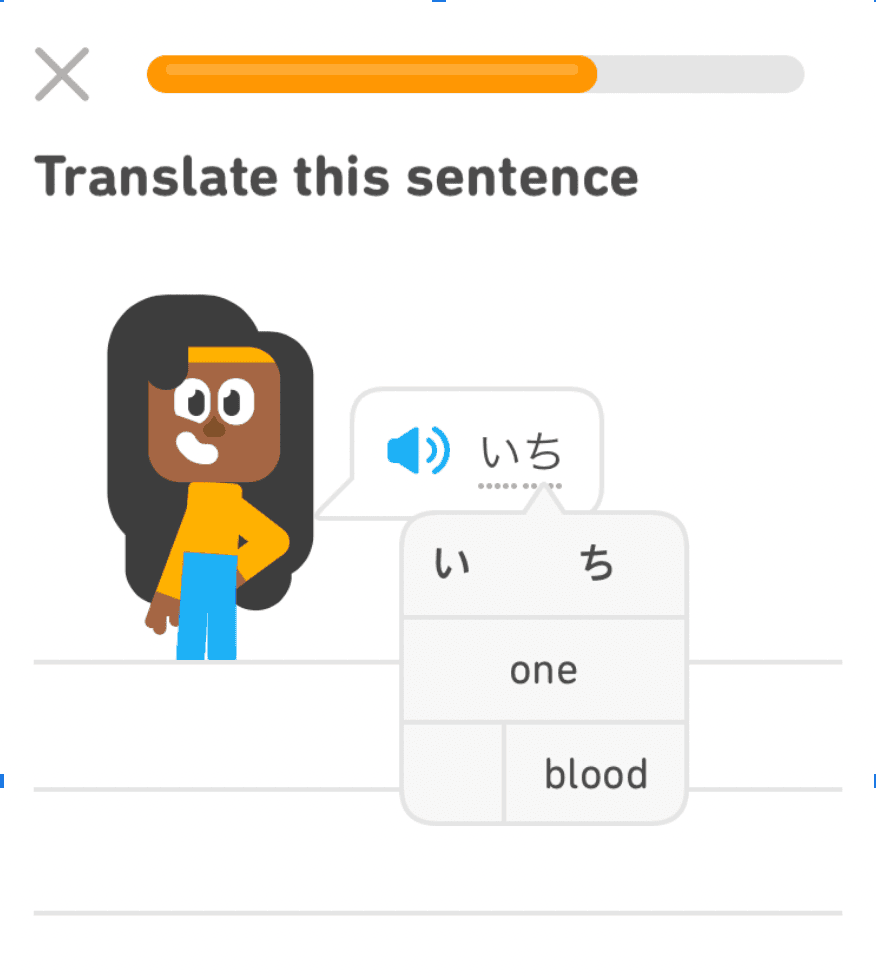
At the time of the screenshot, Duolingo’s first lessons used an in-lesson tooltip to teach new words. In a "Translate this sentence" exercise, a character says the Japanese word いち, which is marked with a dotted underline. Tapping it opens a tooltip that splits the word into its two characters and gives its meanings ("one", and "blood" for one of the characters). Learners can’t translate the sentence without the tooltip, so they open it because they need it, not because they’re told to.
Why it works
- What the user needs: a beginner has no idea what the word means, so tapping it isn’t forced on them. The tooltip answers the question they already have.
- Simple but effective: a dotted underline and a small box with the meaning are all it takes to get learners interacting.
- Clear signal: the dotted underline marks exactly which word can be tapped, without any instruction text.
More on this pattern: tooltips and contextual onboarding.