
User Onboarding
ClickUp’s promoter survey interacts with the users
ClickUp's NPS survey sits in a bar at the bottom of the screen and answers each score with its own follow-up message and an optional comment box.
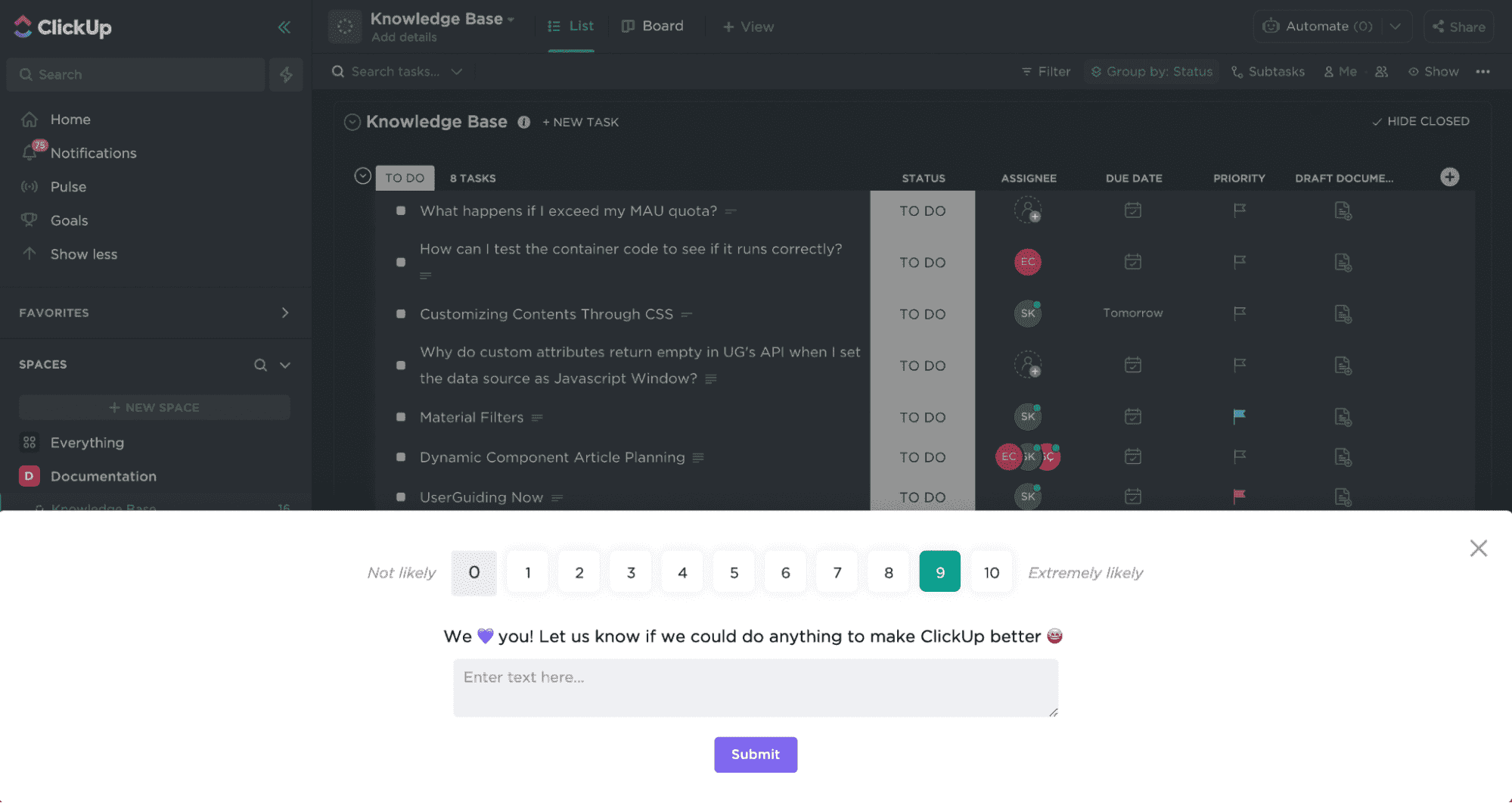
At the time of the screenshot, ClickUp asked for feedback with a Net Promoter Score (NPS) survey in a bar along the bottom of the screen, leaving the workspace visible above it. The scale runs from 0 (Not likely) to 10 (Extremely likely). After a score, a follow-up message appears that depends on the answer: the 9 picked here gets "We 💜 you! Let us know if we could do anything to make ClickUp better", while lower scores ask what went wrong. A text box, a Submit button and a close icon complete it.
Why it works
✅ The right element: a pop-up or a modal covering the whole page is often annoying for a promoter survey. A bar at the bottom asks the question without hiding the user's work.
✅ Personal: because the follow-up message changes with the score, it reads like a reply instead of a form, which makes users more likely to leave a comment.
✅ Skippable: any survey should be easy to skip, and it's often overlooked. The close icon lets users dismiss it, which reflects better on the brand than forcing an answer.
More on this pattern: in-app survey types and customer onboarding metrics.


