Product tour · Tooltip · Hotspot · First use
CapCut’s product tour is short and contextual
CapCut walks new users through its video editor with a short, hands-on product tour of yellow tooltips tied to hotspot beacons.
Screenshot added to the library in March 2023; its exact capture date wasn’t recorded, and the product may look different today. Write-up reviewed 22 Oct 2026.
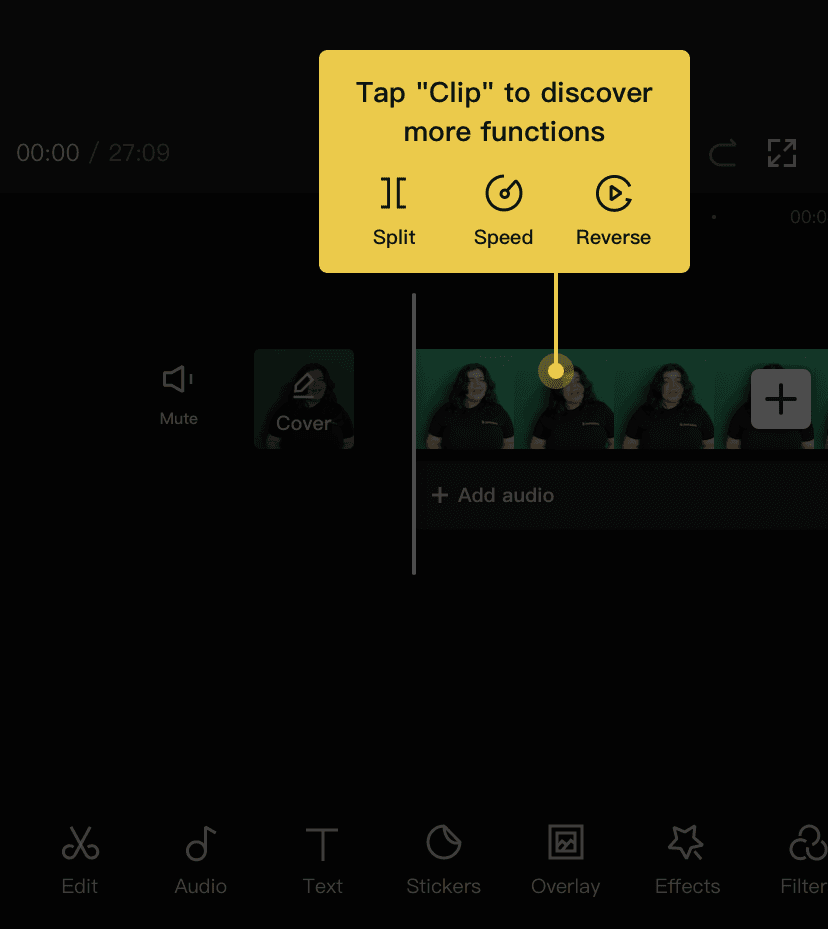
At the time of the screenshot, CapCut introduced its mobile video editor with a short product tour made of bright yellow tooltips, each joined by a thin line to a hotspot beacon on the element it explains. The first one reads "Tap "Clip" to discover more functions" and previews three of them (Split, Speed and Reverse) above the clip on the timeline, while the rest of the editor is dimmed. The tour is hands-on: users try each highlighted element before moving on.
Why it works
- Distinctive design: yellow tooltips with a line down to a beacon stand out against the dark editor, and the background is dimmed just enough to keep the timeline readable.
- Interactive: because users tap each element themselves, they learn what does what by doing it.
- Contextual: each tooltip appears on the element it describes, during editing, while the user’s attention is already there.
More on this pattern: product tours and UI hotspots.