Modal · Upgrade and retention
Canva’s returning user modal is engaging and educating
Canva's mobile app greets returning users with a modal showing their last design, three template ideas and a choice to continue or start afresh.
Screenshot added to the library in December 2022; its exact capture date wasn’t recorded, and the product may look different today. Write-up reviewed 22 Oct 2026.
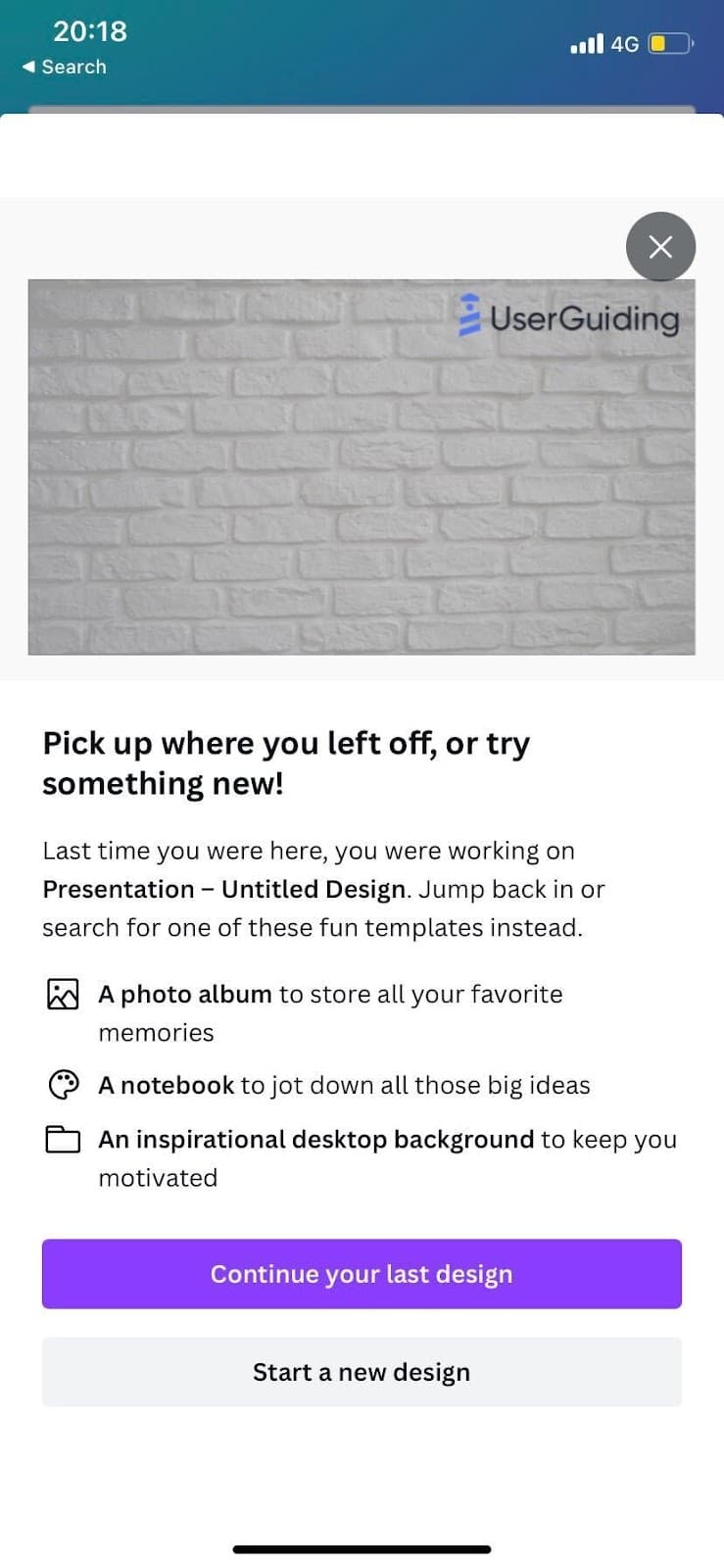
At the time of the screenshot, Canva's mobile app showed a returning user modal to people opening the app after a break. It previews the design they last worked on, names it ("Last time you were here, you were working on" an untitled presentation), and suggests three templates to try instead: a photo album, a notebook and a desktop background. Two buttons split the paths: "Continue your last design" and "Start a new design".
Why it works
✅ Built for re-engagement: the headline "Pick up where you left off, or try something new!" makes the user feel remembered and gives them a reason to stay in the app.
✅ Continuous onboarding: someone who's been away may have forgotten what Canva can make. The three template ideas remind them, one line each.
✅ Visual: the preview of the last design jogs the user's memory faster than a file name would, which makes picking it back up an easy choice.
More on this pattern: UI modals and personalised onboarding.