Modal · Video · Feature discovery
Calendly’s new feature modal features a video
Calendly announces Managed Events in a modal that pairs a short video with three bullet points and a single Get started button.
Screenshot added to the library in February 2023; its exact capture date wasn’t recorded, and the product may look different today. Write-up reviewed 22 Oct 2026.
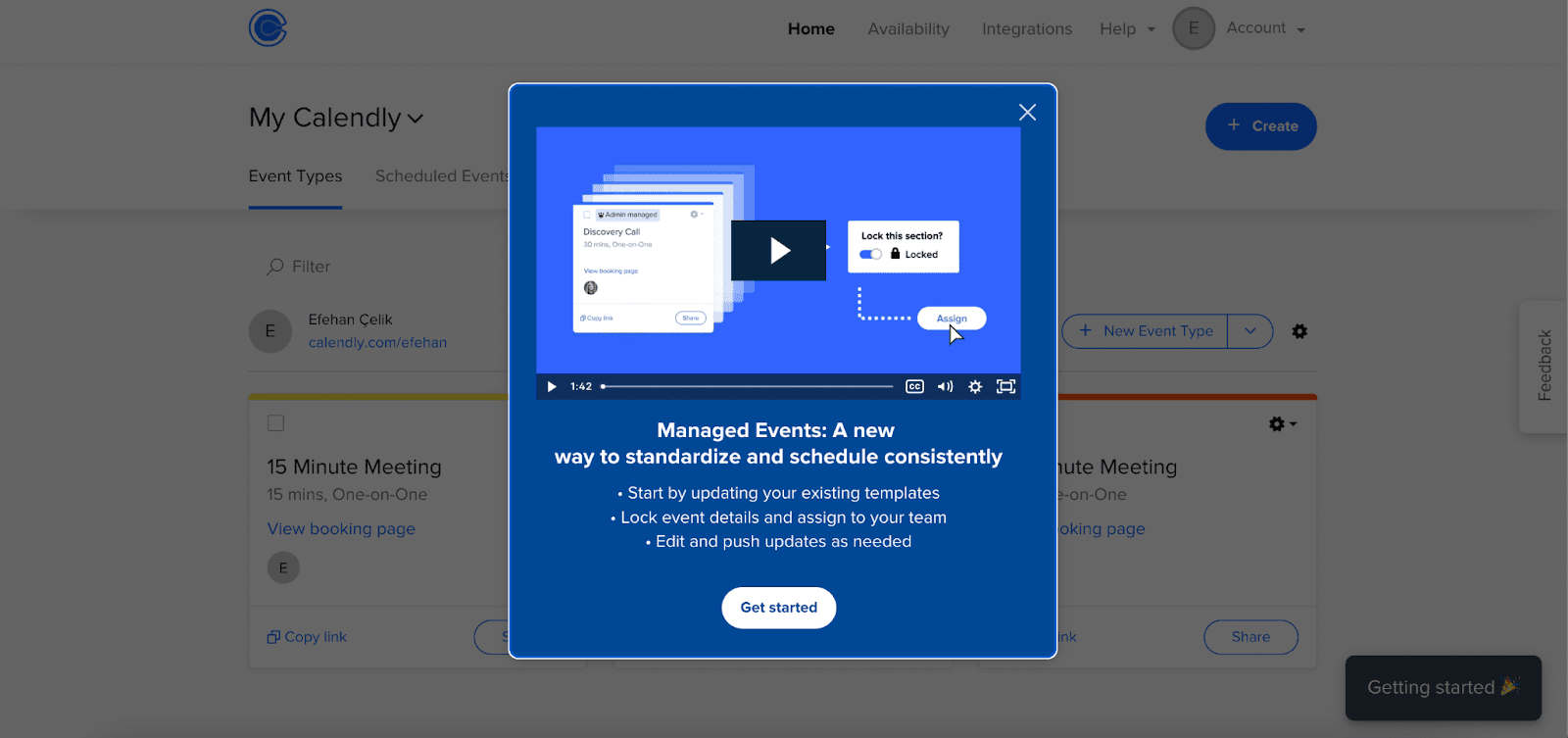
Calendly uses a new feature modal to introduce Managed Events. At the time of the screenshot, the modal opens over the event types page with a video player at the top, a headline ("Managed Events: A new way to standardize and schedule consistently"), three short bullet points on what you can do with the feature, and a single "Get started" button. A close button sits in the corner.
Why it works
- Two ways in: the video shows the feature working, and the bullets give the same message to anyone who won't press play.
- Copy you can scan: each bullet starts with a verb (start, lock, edit) and fits on one line, so the whole modal reads in a few seconds.
- One clear next step: "Get started" is the only button, so there's no doubt about what to do if you're interested, and the close button handles the rest.
More on this pattern: new feature onboarding and how companies use UI modals.